Creating custom Linux solutions
(Compiled from r369)
Copyright © 2002, 2003, 2004, 2005, 2006, 2007 René Rebe, Susanne Klaus
This work is licensed under the Open Publication License, v1.0, including license option B: Distribution of the work or derivative of the work in any standard (paper) book form for commercial purposes is prohibited unless prior permission is obtained from the copyright holder. The latest version of the Open Publication License is presently available at http://www.opencontent.org/openpub/.
(TBA)
Table of Contents
- Preface
- 1. Introduction
- 2. Basic Concepts
- 3. Hardware and Kernel Support
- 4. Building T2
- 5. Inside T2
- A Package
- Description File (.desc)
- Configuration File (.conf)
- Patch Files (.patch)
- Cache File (.cache)
- Package Creation in Practice
- Preparing
- Custom Code
- Testing
- Getting New Packages Into T2
- Compiler Optimisations
- The Automated Package Build
- Working with Variables
- Build System Hooks
- Command Wrapper
- Hacking with Bash
- Bash Version
- General
- Introduction
- How to Watch the Value of a Variable While Running a Script
- How to Interrupt Scripts Based on Conditions
- Exceptions
- How to Skip Part of a Script While Testing
- Convenient Variables
- 6. T2 Target Development
- 7. Installation
- 8. Configuration
- Boot Loader
- LILO
- GRUB
- Yaboot
- SILO
- ABoot
- I have no root and I want to scream
- Linux Kernel
- Managing Filesystems and Files
- U/dev
- Hotplug Hardware Configuration
- Initrd
- Network Configuration
- Configuration File
- Keywords Recognized by the Basic Module
- Keywords Recognized by the DHCP Module
- Keywords Recognized by the DNS Module
- Keywords Recognized by the Iproute2 Module
- Keywords Recognized by the Wireless-tools Module
- Keywords Recognized by the Iptables Module
- Keywords Recognized by the PPP Module
- Profiles
- Configuration Examples
- Command-line Tools
- Tricking With Pseudo Interfaces
- Compatibility
- NFS (Network File System)
- CFEngine - a Configuration Engine
- A. Partitioning Examples
- B. Serial Console
- C. Copyright
- Index
List of Figures
- 2.1. T2 basic overview
- 4.1. T2 config screenshot
List of Tables
Table of Contents
This book is written to document the 7.0 series of the T2 System Development Environment (SDE), but is intended to be useful for reference with earlier versions such as 6.0 and 2.1. Where incompatible changes have been implemented we tried to outline them.
This book is written for computer-literate folk who want to use T2 as operating system or system development environment for custom Linux appliances - such as: router, firewall, network attached storage (NAS), desktop, server or embedded boards and products.
This book aims to be useful to people of widely different backgrounds—from people who only intend to install final products based on T2, up to experienced system administrators, system integrators and developers who need an inside into every detail of the T2 environment. Depending on your own background, certain chapters may be more or less important: While administrators and developers might be most interested in quickly getting to the details in Chapter 4, Building T2 and Chapter 5, Inside T2, end-users can rather skip over the T2 internals and start reading Chapter 7, Installation and Chapter 8, Configuration.
This section covers the various conventions used in this book.
- Constant width
Used for commands, command output, and switches
Constant width italicUsed for replaceable items in code and text
ItalicUsed for file and directory names
Note
This icon designates a note relating to the surrounding text.
Tip
This icon designates a helpful tip relating to the surrounding text.
Warning
This icon designates a warning relating to the surrounding text.
Note that the source code examples are just that—examples. While they should compile with the proper compiler incantations, they are intended to illustrate the problem at hand, not necessarily serve as examples of good programming style.
The chapters that follow and their contents are listed here:
- Chapter 1, Introduction
Is a short introduction to T2.
- Chapter 2, Basic Concepts
Covers the history of the T2 SDE as well as its features, architecture, components - a general overview and why it is different.
- Chapter 3, Hardware and Kernel Support
Is a short overview about the hardware architectures as well as the Operating Systems so far support by T2.
- Chapter 4, Building T2
Outlines how to build your own flavour of T2 from the provided source code repository.
- Chapter 5, Inside T2
Describes the internals of T2, the package descriptions, the build system, the configuration and all the details from a developer's point of view. It further demonstrates how to create new package as well as the automated build process in great detail. Followed by in-depth descriptions of the hooks and variables available to take over control.
- Chapter 6, T2 Target Development
Covers how to create custom targets, that is Linux solutions and appliances with T2. How to control all the details and permanently keep the configuration, cleanly separated from the remaining T2 source tree.
- Chapter 7, Installation
Walks through a classic, textual installation of an installable end-user T2 flavour as well as the LiveCD and gives some specific hints for embedded boards and the Wrt2 wireless router.
- Chapter 8, Configuration
Discusses the various configuration details, from CPU architecture dedicated boot loaders and their specific configuration settings over users and permissions to other every day preferences and tweaks.
- Appendix A, Partitioning Examples
Describes the details of platform dependant partitioning and the related software tools.
- Appendix B, Serial Console
Discusses how to use a serial console for headless servers and embedded boards (or just for debugging).
This book started out as bits of documentation written by René Rebe, which were then gradually updated and enhanced according to the changes and progress made in T2 as well as user and developer feedback. As such, it has always been under a free license. (See Appendix C, Copyright.) In fact, the book was written in the public eye, as a part of T2. This means two things:
You will always find the latest version of this book in the book's own Subversion repository.
You can distribute and make changes to this book however you wish—its under a free license. Of course, rather than distribute your own private version of this book, we'd much rather you send feedback and patches to the Subversion developer community. See ??? to learn about joining this community.
A relatively recent online version of this book can be found at http://www.t2-project.org/documentation/.
This book would not be possible - nor very useful - if T2 did not exist. For that, the authors would like to thank Clifford Wolf for starting ROCK Linux and all the countless people who contributed to it and T2 over the last decade.
We also would like to thank all who contributed to this book with informal reviews, suggestions, and fixes: While this is undoubtedly not a complete list, this book would be incomplete and incorrect without the help of: Lars Kuhtz, Valentin Ziegler, Urs Pfister, and the entire T2 community.
Special thanks to Ben Collins-Sussman, Brian W. Fitzpatrick, and C. Michael Pilato for their outstanding XML Docbook setup as created for the Subversion book, which is also used to transform this book into the final PDF, PostScript(tm) and HTML form.
We hope you find this book a joyful read. Joy and collaboration is what made GNU/Linux great and it is in that spirit T2 has been created and evolves!
Table of Contents
T2 is not yet another Linux distribution: It is a flexible System Development Environment allowing not only the automated rebuild to create a new version or to optimize for the target CPU in use, it even allows the creation of adapted distributions. The level of adaptation reaches from simple package selection (e.g. KDE, GNOME, Xfce, Apache, Samba, etc.), special purpose patches (e.g. special features for GUI applications, specially patched kernels, ...), custom output format (such as Live-CD or ROM image for embedded systems) to tight integration with 3rd party administration, management, networking or other software. In summary T2 is an integrated development environment for custom distributions.
The possible application range includes normal servers, desktop systems, specialized firewalls, routers or Network Attached Storage solutions and all kinds of embedded devices.
The T2 framework includes the automated build system, architecture and target descriptions, as well rich set or packages descriptions - currently already over 2800! These package descriptions only contain parameters needed to build a package and information for the end-user installer. Additionally the T2 packages are left unmodified wherever possible. So that by default the packages behave in the way as intended by their upstream authors. Patches are only included if needed for clean compilation (e.g. cross compilation) or bug and security fixes - not the intrusive set of patches most often included in other commercial distributions.
T2 is a fork from ROCK Linux[1]which in turn is not based on another distribution - it was developed from scratch in 1998 by Clifford Wolf and many other contributors.
The name 'T2' started as an intern project name for "try two, second try" and "technology (level) two" and was not intended as final project name. However, T2 became too popular within the first months and thus the name was not easy to change anymore and eventually became the official project name.
At this point we would like to point out that T2 must not be hard to install. While there is indeed a classic installer option which includes a text mode installer where one need to be a fairly experienced Linux user, more user-friendly options, such as a LiveCD (DVD, USB stick, ...) option, exists as well. Additionally a T2 target can add its own startup and install setups and thus innovate in this area.
However many users and administrators still prefer the classic textual install as it offers a great deal of flexibility and control. For example all the services have to be turned on by hand and you have to be able to understand most configuration files from the original packages. T2 does not contain an intrusive set of system administration utilities - however the basic system configuration is provided by our setup tool STONE. Powerful and yet complex tools need to be set up correctly - and colorful setup tools hide the fact that the administrator needs to be informed about the configuration details. Those automated everything tools are one of the reasons for all the SPAM and worms flooding the Internet. So think again if you see that as a problem - it also teaches you how to do things right.
Note
To Linux newbies: Building a server configuration with T2 can involve a steep learning curve. Nevertheless it is a very rewarding experience and after some months you will realise you will never look back. Make sure you have time to dive in and understand what it is all about. Linux is one of the best documented operating systems in the world! Make sure to tap those resources.
But because of its clean structure and packages T2 Linux is a very good Linux edition for system administrators and end-users. T2 Linux was developed from scratch and is maintained by a collaborative group of people.
T2 is cross-architecture.
Portability is a great advantage of T2. It is possible to cross-compile easily or add new architectures in a short time. Currently there is support for Alpha, ARM, AVR32, Blackfin, CRIS, HPPA, HPPA64, IA64, MIPS, MIPS64, Motorola 68000 (68k), PowerPC, PowerPC-64, SPARC, SPARC64 (UltraSPARC), SuperH, x86, and x86-64.
T2 is cross-platform.
Due to the nature of the automated build system and clean, parameterized packages it is easy to exchange the Linux kernel with Hurd, Minix, a BSD, Haiku, OpenSolaris or OpenDarwin to build a complete non-Linux platform. Work to support Minix and OpenBSD has begun, however this still lacks more volunteers.
Another way to utilize T2 is to build single packages into foreign binary-only systems. Systems where the kernel or user interface sources are not open, such as Apple's Mac OS X or Microsoft's Windows. T2 could be used as add-on manager for open source packages.
T2 aims to use as few patches on packages as possible.
T2 is different, it takes the form of a group of scripts for building and installing the distributions. One of the basic assumptions is that packages should be installed following the standards of their creators. This contrasts with the patched up systems created by most other distributions. T2 only patches when absolutely necessary: compile, security and bug fixes only.
T2 contains the latest versions of packages.
One great aspect of T2 is that the package configurations usually point to the latest packages and so also one of the latest kernels.
One great benefit of Open Source software is that software gets updated often. With T2 you get a tool to update your entire distribution often - instead of regularly updating the kernel and packages by hand. Together with a tool like Cfengine (GNU Configuration Engine , see \cite{CFENGINE}) you get an environment which can be updated easily. In fact T2 users tend to run really up-to-date systems.
T2 is completely self-hosting.
It has been proven that the enormous utilization of core applications within a complete T2 Linux build is a really good stress-test for these packages and helps to find bugs, reaching from very trivial to the very intricate.
T2 is complete.
Although minimal T2 distribution can be rather small (less than 10 MB for an embedded firewall) you can already get a compact functional system from the minimal package selection template. Nevertheless, T2 includes a big package repository with a wide-range of application areas: X.org, KDE, GNOME, Xfce, Apache, Samba, Suid, and multiple thousands more. Among those are also quite a exceptional selection of special purpose, minimal embedded packages such as dietlibc, uclibc, busybox, embutils, dropbear and many others not commonly found in other systems.
Extending T2 is easy.
In the case you want to add a package to T2 you normally only need to fill some textual meta information. All packages get downloaded from the original locations. For each package T2 just maintains meta-data.
The build-system builds most package-types automatically and modifying a package build, or even replacing its build completely for a new target, can be achieved within the target.
Scripting is power.
Because of the fact that T2 consists of shell scripts it is easy to see what is happening under the hood. Also it gives you the possibility to change the automatisms according to your own needs. The included targets are just examples of such adaptations and contrasts to e.g. RedHat's policy not to support any automated RPM rebuilds (in addition to the often not-compileable sRPMs).
In fact the system has proves to be very powerful just because of the scripting system.
T2 is the ultimate do-it-yourself distribution.
The build and install system is easily accessible and modified to one's own needs. Furthermore the direction T2 development has taken emphasises this particular strength of the distribution.
There is no other SDE
There is no other SDE where you can define a target, with package selection, package modifications, optimization settings and cross-compile builds in such flexible and complete ways.
T2 adheres to standards.
T2 gets as close to standards as it can. But with a pragmatic view. For example it uses the FHS (File Hierarchy Standard) and LSB (Linux Standard Base), but with exceptions where impracticable.
T2 makes no assumptions about the past.
If you have been using one of the major distributions like SuSE or RedHat you'll realise a lot of items have been patched in. This increases the dependency on those distributions (intended or not). It is hard for the larger distributions to revert on this practise because of backward compatibility issues (when upgrading). T2 will patch some sources (for example when a package does not comply with the FHS), but leaves it to an absolute minimum - for example no added features or branding.
The same philosophy applies to T2 itself. T2, and its package system, have gone through several redesign phases and little consideration is given toward backward compatibility. This may be inconvenient, but the fact is that every incarnation of T2 is cleaner, yet more powerful than its predecessor.
T2 is built optimally.
With T2 all packages are built with the optimisations you want and the target platform. Other distributions usually build for generic i386 or Pentium. With T2 you can automatically build Linux, glibc, X.org, KDE, GNOME and the other CPU intensive packages - yes the whole distribution! - optimized for your CPU.
T2 uses few resources.
T2 build and installation scripts are Bash scripts. Due to the optimization for a given CPU, the non-X11 based installation and setup as well as the lightweight init scripts you can save many resources on old computers. Additionally space optimized alternative C libraries such as dietlibc and uclibc as well as minimal add on tools such as busybox and embutils can reduce resource use drastically. Also available are more lightweight choices in various other areas from Xfce to lightweight http servers, init systems, ...
Services have to be turned on explicitly
Also packages and services have to be turned on explicitly, manually. When you boot a fresh T2 installation you'll find the minimum of services configured to be active.
From the system administrator's perspective this is ideal for new installations. It compares favourably with cleaning up and closing all services of a bloated commercial distribution.
T2 is ready to burn on a CDROM.
After building T2 from sources you can burn the (target) T2 distribution directly onto CDROM for installation on other machines (and pass it on to other people).
T2 can easily be installed over a network.
The installation process is terminal based. Installing remotely and configuring the new system over a network connection is not uncommon.
There is no other distribution like T2 Linux.
By now it should be clear T2 does not look like any of the other distributions. Debian, while also a collaborative effort, is a great distribution but is in many ways more like the commercial editions. The BSD variants come closer.
The only one that has come close recently are OpenEmbedded and Gentoo. It is interesting to see where these build-it-yourself (meta) distributions compare and differ to the System Develoment Environment T2:
Table 1.1. T2 SDE, OpenEmbedded and Gentoo compared
| T2 | OpenEmbedded | Gentoo |
|---|---|---|
| Bash based | proprietary BitBake based | Python / Bash based |
| chroot build | ??? | chroot build |
| developer and end-user oriented | developer oriented | end-user oriented |
| fully automatic package build type detection | BitBake recipes with inheritance | each package needs a full ebuild script |
| autodetected dependencies | manually hardcoded dependencies (many monkeys method) | manually hardcoded dependencies (many monkeys method) |
| sophisticated wrappers | ??? | hardcoded e.g. CFLAGS |
| installable, live, and firmware ROM images | firmware ROM images | rebuild on each system, LiveCD creation as add-on scripts (Catalyst) |
| multiple alternative C libraries | multiple alternative C libraries | just the single packages, no whole-build support |
| multiple init systems | ??? | just the single packages, no sophisticated pre-configuration |
| cross build of X.org and more | cross build of some (how many ???) | no integrated cross build support, seperate Embedded Gentoo effort |
| cluster build, distcc, icecream, ... | ??? | - |
| separated target config and custom file overlay | seperated target config, likewise | emerge, edit compile on each system |
| thousands of packages | mostly embedded package subset, not all desktop and server packages | more and more packages get removed (into external overlays, such as E17 et al.) |
The biggest difference is that Gentoo does not include the facility to predefine targets and their custom setup permanently. Instead on Gentoo everyone re-emerges all the packages via pre-built binaires or source code on each system. Inconvienient for developpers is, that Gentoo does not include an auto-build-system like T2 does. Each package needs a full .ebuild script where even the tar-balls extraction is triggered manually - and often even the resulting files are copied by hand. Gentoo and OpenEmbedded also are based on hardcoded dependencies - in contrast T2 determines them automatically and stores them into a cache.
The biggest difference to OpenEmbedded is that T2 uses normal shell scripts to implement the build system, while OpenEmbedded bases on a properitary BitBake tool and associated meta-data that must be explicitly installed and is yet a properitary format to learn. Getting started as well as the learning curve is way easier in the T2 world and thus it is most comfortable to use T2 as a foundation for building your own (specialized) distribution. It is therefore we call it a System Development Environment, abbreviated to: SDE. Also the T2 build system is faster and supports distributed cluster builds (via distcc and icecream) and compiler caching (via ccache). You can find more information about these tools at http://distcc.samba.org/, http://en.opensuse.org/Icecream and http://ccache.samba.org.
It has been stated T2 Linux is more BSD with a GNU/Linux core than anything else: T2 has a ports collection (called package repositories), a make world (called scripts/Build-Target) and like OpenBSD prefers the disabled feature by default method. This may make OpenBSD T2's closest relative.
T2 has a mailing list and an archive thereof. It is a good idea to subscribe and to voice your ideas and amendments. Not like Groucho:
It is better to remain silent and be thought a fool, than to open your mouth and remove all doubt.
Often there is discussion on IRC:
irc.freenode.net channel #t2
You can find a threaded digest of the mailing list at http://www.t2-project.org/contact/.
Finally the T2 SDE website contains a nice search facility which can be really helpful. In fact, before sending a mail to the mailing list, take a quick look first. It is likely someone has had the same problem before.
[1] The fork happened due to major technical disagreements in the ROCK Linux 2.1 development series, as well as ongoing communication problems, disagreements in project management, openness and Linux conference presentations.
Table of Contents
It was not that easy to develop a whole (Linux) system from scratch, especially as years ago all the many details where not as documented as they are today. Bootstrapping a complete system from scratch required in-depth knowledge about the kernel, compiler and system libraries and to solve some obstacles in order to get all the toolchain and library parts correctly built together to form a functional system. That is also why most of the many Linux flavours build upon existing Debian, RedHat or SuSE distributions - just extracting the pre-built binaries and injecting a few custom files. T2 on the other hand is among the few designed from the ground up to define a system without historic cruft with the additional bonus of the automated build system to inject custom modifications as needed.
Designing a self-hosting system, one that can be used to re-build itself, is the next technical challenge.
The T2 SDE is booth, designed from the grounds up with an infrastructure optimized for (cross-)compiling from package sources - as automated as possible - as well as selfhosting.
Vast amount of work was put into setting the whole infrastructure up for cross compiling to all the different CPU architectures supported.
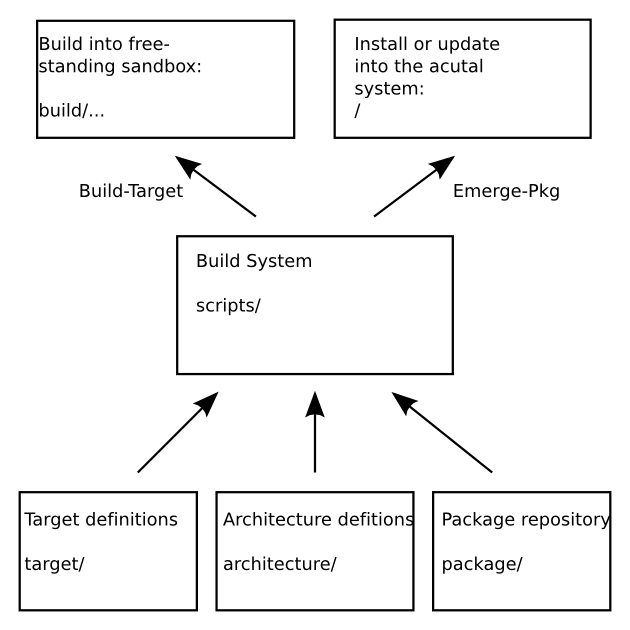
The T2 SDE automatic build system is written in form of shell scripts. The main components with additional tools can be found in the directory scripts/.
It is responsible for parsing package meta-data and config files, creating the T2 sandbox environment with its file modification tracking functionality and command wrappers, packaging the result and all the other needed actions between the steps in the build chain. It is also able to perform dependency analysis and includes the menu-driven configuration program to configure the build.
Usually there is one script for a specific function, for example: scripts/Config, Download, Build-Target, Create-ISO among others. Some scripts are also re-used internally, for example scripts/Download is invoked automatically on-demand, to fetch the packages sources when they are required.
T2 build scripts are all run from the T2 top-level directory, like scripts/Config and scripts/Build-Target and parse and process the various meta information from the respective directories such as package/, architecture/ and target/
The package meta-data is defined by key-value pairs in various package repositories located in a sub-directory named package/ sorted into categories like package/base, package/network, package/x11, and so on. For each package a Text/Plain .desc file contains the original author, the T2 maintainer, license, version, status, download location with checksum, textual information for the end-user and architecture limitation as well as additional optional tags (see the section called “Description File (.desc)”). Patches needed to compile the package or to fix security or usability bugs can simply be placed in the package directory.
While the automated build system iterates over all packages to be built, it parses the package's meta-data and extracts the source tar-balls, applies all the patches and detects the build type of the source automatically (e.g. configure make, xmkmf, plain make or variations - see the section called “The Automated Package Build”) and builds the package with generated default options. For packages where modifications in the process are appropriate a .conf file for the package can modify variables, add commands to predefined hooks or replace the whole process. An automatically generated .cache file holds generated dependency information as well as reference build-time, package file count and the package size.
Additionally CPU architecture specifica is located in the architecture/ directory, including optimization options, patches or other required quirks.
The target configuration, patches and other payload resists in targets/.
Before T2 2.0 "sub-distributions" where extracted out of a fully built distribution as a sub-set. This had the drawback that the first build needed to build all packages needed by the sub-distributions and that sub-distributions only had the possibility to modify the packages to a minimal degree since this had to happen after the normal package build.
With T2 2.0 "targets" where introduced as a smarter way of dealing with specialization: A target limits its package selection and thus download as well as build to what is really required. Furthermore it and can modify any aspect of a package build, apply custom feature or branding patches and even replace the logic to build a package or final image creation process completely.
T2 is under continuous development, with the development work beeing done in the version control system - currently Suversion. With a version as target milestone, for example 7.0, 8.0, ... When most development goals are archived, this trunk is branched and this version prepared for the release. In parallel development continuous in the trunk with the next milestone version, 8.0 in this case. So each version milestone has a release series in the end of the development cycle. Though the development version from the trunk usually work well enough to download and build a common Linux system, there is no guarantee that all architectures, C libraries, packages and target configurations build perfectly at any given time.
The packages of the development trunk tend to be more up to date than the stable ones, as the branches are usually maintained with API and ABI compatibility in mind and mostly include security and compile fixes only. Sometimes the development edition will be in research mode adapting the latest kernel, C library, compiler or CPU architecture combination or rearranging the build scripts for new features, concepts and cleanups.
If you are a normal user or administrator of production machines you should choose to use the latest stable branch. The development tree is usually used by developers, while users and administrators often only try the trunk when it approaches the next stable release.
Table of Contents
In the beginning T2 was created to compile i386 GNU/Linux specifically optimized for a given x86 CPU such as Intel's Pentium or AMD's K6 to benefit as much of latest instruction extensions the processor manufacturers integrated into their CPUs.
As this goal was reached quickly - additional, more powerful but also, at that time, harder to get architectures where targeted: Alpha, PowerPC and SPARC. Later on UltraSPARC, MIPS, MIPS64, HPPA eventually where adapted as their price dropped into reasonable margins. Due to the flexibility of the scripted and open build process IA-64 as well as x86-64 could be supported immediately when they where introduced by their manufacturers. Just the toolchain support patches had to be pulled in and all the packages could be cross-compiled automatically.
Supporting the whole range of personal computer and workstation platforms was just the beginning and the developers set on to support the various CPUs used in embedded systems such as: ARM, Motorola 68000, SuperH and the newer: AVR32, Blackfin and Cris CPUs.
As some of the CPUs do not come with a Memory Management Unit (MMU), support for the modified Linux variant named uClinux supporting MMU-less architectures was added.
Additionally add-on kernel patches such as RTAI for real-time capability can optionally be enabled to be applied.
With all the many volunteers and employees working and contributing to Linux world-wide Linux is one of the most flexible kernel to choose. Even in absence of a MMU it is capable of running on a wide range of CPUs, supporting real-time requirements and allows choosing from a great pool of different CPU architectures to match exactly the performance and power consumption requirements set by the target system specification.
Despite Linux' strong support for various CPU architectures, including MMU-less systems and real-time capabilities, as monolithic design Linux is still kind of vulnerable at least in regard of programming mistakes. For example dereferencing bad pointers, out of bounds array access are able to crash the whole kernel. Imperfect loop conditions, e.g. in combination of unexpected hardware conditions can also result in infinite loops and thus stall the whole system.
This is where Minix as an open source implementation of micro-kernel shines with self healing capabilities such as reloading crashed or unresponsive driver processes.
However at the time of writing Minix only supports x86 CPUs, while ports to PowerPC and ARM are in progress. The minimal size of the bare microsystem kernel however could potentially decrease the amount of work required for new architecture ports as well as the isolated driver process model decrease the edit-compile cycle during device driver development.
Implementing support for other, open source operating systems inside the T2 SDE is not that hard at all. As many of the included packages are either plain ANSI C or C++ code that compile on any system anyway, or the platform dependant bits are already ported to the vast majority of systems adding a new OS kernel to T2 comes down to:
adding a suitable "kernel header" package
adding the matching C library)
adding the matching C compiler (if any other than GCC)
adding the kernel packages itself
adding some definitions such as registration of the kernel name to T2
adding other custom packages, e.g. for network and firewall utilities, graphic subsystem packages et al.
Table of Contents
First thing to do is to choose one of the T2 Linux versions and download it from http://www.t2-project.org/ (see also ???). A tarball of the distribution scripts is only a few MB in size and downloads quickly.
T2's stable versions go hand-in-hand with stable Linux kernel versions. Nevertheless most T2 users use the development versions of T2 Linux anyway . One addicting feature of T2 is that you get the latest version of every package, including the kernel. The development versions of T2 have proved to be pretty robust. Nevertheless a development version can potentially be broken.
Untar the file and it unpacks documentation, build scripts and the directories with package definitions.
The size of T2 Linux is so small because it is only contains the build scripts and meta information for downloading the kernel and packages from the Internet. The rest of the distribution gets downloaded in the next phase.
Once you have unpacked the distribution you can see directories like:
Documentation - includes the INSTALL and FAQ documents
architecture - contains the definitions particular to a platform
download - where the downloaded tar files will be stored
misc - miscellaneous files including the source of internal helper applications
package - contains the definitions for downloading and installing packages grouped into several repositories
scripts - contains the configuration, download and build scripts
target - contains the target definitions
In former (CVS) times the T2 source tree was kept in sync using rsync. However nowadays, with powerful version control systems being invented in the meantime, T2 the sources should be accessed using them. The drawback is that you can not get updates with an extracted tar-ball as base - you need to checkout the sources via the version control system. Currently all source trees of T2 are hosted inside a Subversion repository. The command to get the latest sources via Subversion is:
svn co http://svn.exactcode.de/t2/trunk t2-trunk
You even have the choice to use a read-only replicated server:
svn co http://svn2.exactcode.de/t2/trunk t2-trunk
Alternatively you can use the svn:// protocol, it usually offer a performance gain and if you have an account with write access, or plan to contribute a lot of changes back the https:// protocol must be used, as write access is only offered thru an encrypted channel.
To access a stable tree in favor of the development trunk, just replace trunk with branches/6.0 or an equivalent. You can even checkout tagged released by using tags/6.0.0 - just substitute the version you need.
When you already use Subversion to obtain the source you also have the possibility to switch to another branch or tag while just receiving the changes using the svn switch command.
Let us suppose you have checked out the development trunk but decide you need the controlled stability of the stable trunk: The associated svn command to execute would be:
svn switch http://svn.exactcode.de/t2/branches/6.0
To switch to a specific tagged version you need:
svn switch http://svn.exactcode.de/t2/tags/6.0.3
This section discusses the T2 build system as it has been implemented since version 2.0 and we assume that you want to build an end-users boot-able and install-able target like the generic, minimal, desktop or server target.
T2 requires just a few prerequisites for building:
a Bash shell: as the T2 scripts take advantage of some convenient Bash specific features and shortcuts
ncurses: for the scripts/Config tool
cat, cut, sed & co: for the usual shell scripting
The build scripts will check for the most important tools and print a diagnostic if a tool or feature is found missing.
More information can be found in the trouble-shooting section (see the section called “Troubleshooting”) and kernel configuration (see the section called “Linux Kernel”).
T2 comes with a menu driven configuration utility even for the build configuration:
scripts/Config
which compiles the configuration program (you need gcc installed for this).
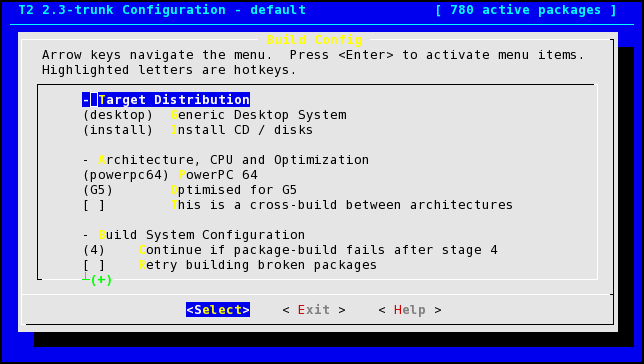
The most important option (ok - well maybe the most important after the architecture for the build ...) is to choose a so-called 'target'.
Relevant targets are:
Generic System
Generic Embedded
Exact Desktop System
Archivista (Scan-)Box
Sega Dreamcast Console
Psion Windermere PDA
Reference-Build for creating *.cache files
Wireless Router (experimental!)
Most of the targets have a customization option. The "Generic System" customization looks like this:
No package preselection template
Minimalistic package selection
Minimalistic package selection and X.org
Minimalistic package selection, X.org and basic desktop
A base selection for benchmarking purpose
Also depending on the target type the distribution media can be selected. For the "Generic System":
Install CD / disk
Live CD
Just package and create isofs.txt
Distribute package only
If you want to alter the package selection (performed by the target) this is finally possibly at this stage, under the expert menu. The deselected packages are also not downloaded from the Internet.
So now we start configuring the target that will build the packages for the system:
scripts/Config
The most useful options in scripts/Config are:
Always abort if package-build fails: Deselect normally, so your build continues (there are always failing packages.
Retry building broken packages: When starting a rebuild (after fixing a package) the build retries the packages it could not build before.
Disable packages which are marked as broken: When checked T2 will not try to build the packages that have errors (as noted in the cache file see the section called “Cache File (.cache)”)
Always clean up src dirs (even on pkg fail): Select when you need the disk space - though it can be useful to have the src dir when you need to troubleshoot.
Print Build-Output to terminal when building: Select for exiting output.
Make rebuild stage (stage 9): Select only if you have too much CPU power or are paranoid to solve rare dependency problems between packages. The downside is a doubled total build time - and should normally not be necessary.
Now the auto-build-system has a config to use and can so determine which packages are requested to be downloaded and build. The scripts/Download contains the functionality to perform the downloads - and when started with the -required option it only fetches the sources needed by the given config.
scripts/Download -required
Downloads the selected packages with which you can build a running system. See the section called “Download Tips” for some tips.
Downloading the full sources for the various packages used may takes a while - depending on how fast you can move up to 2Gb through your Internet connection. While waiting you may want to go out, sleep, work and go through that routine again.
The Download script may complain you have the wrong version of bash and you need curl.
The full options of scripts/Download are [2]:
Usage:

 scripts/Download [options] [ Package(s) ]
 scripts/Download [options] [ Desc file(s) ]
 scripts/Download [options] -repository Repositories
 scripts/Download [options] { -all | -required }

 Where [options] is an alias for:
    [ -cfg <config> ] [ -nock ]  [ -alt-dir <AlternativeDirectory> ]
    [ -mirror <URL> | -check ]  [ -try-questionable ]  [ -notimeout ]
    [ -longtimeout ]  [ -curl-opt <curl-option>[:<curl-option>[:..]] ]
    [ -proxy <server>[:<port>] ] [ -proxy-auth <username>[:<password>] ]
    [ -copy ] [ -move ]

 On default, this script auto-detects the best T2 SDE mirror.

 Mirrors can also be a local directories in the form of 'file:///<dir>'.

 scripts/Download -mk-cksum Filename(s)
 scripts/Download [ -list | -list-unknown | -list-missing | -list-cksums ]
Quite a few contributors and sponsors of T2 Linux have created mirrors for source tar balls - scripts/Download tries to select the fastest mirror.
Sometimes a mirror is incomplete or out-of-date. The Download scripts will try to fetch the file from the original upstream location in that case. If too many files are missing on the mirror that was selected, you might however like to choose another one.
To select a specific mirror:
scripts/Download -mirror http://www.ibiblio.org/pub/linux/t2/7.0
Running scripts/Download with the argument '-mirror none' will instruct the scripts to always fetch the sources from the original site, first.
All packages get downloaded from the original locations. For each package the T2 distribution maintains a package file which points to the ftp, http or cvs location and filename. Sometimes the download site changes, more often the version numbering of a file changes. At that point the package file needs to be edited. After a successful download you may send the patch to the T2 Linux maintainers - so others get an automatic update.
Missing packages are not necessarily a problem. If you are aware what a package does and you know you don't actually need it you can pretty much ignore the error. For base packages it is usually a good idea to fetch them all.
It may be useful to download the most recent version of T2 (stable or development) since it will reflect the most recent state of the original packages.
To actually find which files are missing run:
scripts/Download -list-missing
If a package fails to download because it is not on a mirror and the original has moved away you may want to fix the URL in the package directly.
Find the package in the package directory and modify the package.desc directly. Update the URL in the [D] field and set the checksum to 0. Also update the [V] version field if it has changed.
With the fixed URL re-run:
scripts/Download -required
or if there are some more files in the queue, downloading explicitly a single package can be forced with:
scripts/Download packagename
If it worked and the package builds fine (see Chapter 4, Building T2) it is recommended you send in the change to the T2 maintainers - to prevent other people from going through the same work (see the section called “Getting New Packages Into T2” for more information). The one thing you'll have to do is to fix the checksum in the [D] field (see the section called “Checksum”).
The Download script has a facility for checking the integrity of the downloaded packages. It does so during each download - but you can also run a check manually:
scripts/Download -check -all
iterates over all the packages and checks for matching checksums. If a package got corrupted, in one way or the other, it returns an error.
To get the checksum of a single tarball:
scripts/Download -mk-cksum path
Or use the even easier script which creates a checksum patch automatically:
scripts/Create-CkSumPatch package > cksum.patch
patch -p1 < cksum.patch
in short just:
scripts/Create-CkSumPatch package | patch -p1
Before starting a new download it is an idea to create the 'download' directory and mount it from elsewhere (a symbolic link will not work with the build phase later, though in this stage it will do) this way you can use the same repository when moving to a new version of the T2 Linux scripts (check the section called “Unknown Files”).
When going through several cycles of upgrading and downloading packages (see also the section called “Download Tips”) you'll find the same packages with different versions of tarballs in your download tree (e.g. apache-1.25 and apache-1.26). The older files (apache-1.25) are considered obsolete and are named 'unknown files' in T2 jargon.
scripts/Download -list-unknown
To remove unknown files (treating it as white-space separated list and only pass thru column 2):
scripts/Download -list-unknown | cut -d ' ' -f 3 | xargs rm -vf
or since recently just:
scripts/Cleanup -download
To build the target you must be root. There are two main reasons why this is currently the case:
For normal builds with a native compilation phase chroot is used. However, the chroot system-call commonly is only allowed for the root user.
Various files require special permissions as well as probably specific owner and group settings for the resulting system work properly. However, those ownership and permission settings are only allowed to set for the root user.
To compensate for this, pre-load libraries, such as implemented with fakeroot, could be used to intercept and fake this meta-data while building, and this also is on the future T2 roadmap to integrate.
To build the target, execute as root:
scripts/Build-Target
which starts building all the stages (see the section called “Build Stages”). The output of the build can be found in build/$SDECFG_ID/TOOLCHAIN/logs/.
In the stable series this happens only rarely - but it might happen sometimes in the development series. Packages can break because they go out-of-date (dependencies do not match) or because the downloaded package mismatches the build scripts, or maybe, because there is something wrong with your build environment.
The output of the build process of the individual packages is captured in the directory build/$SDECFG_ID/var/adm/logs/. All the packages with errors show the .err extension.
A tabular overview is provided by scripts/Create-ErrList, like for example:
Error logs from live-7.0-trunk-desktop-x86-pentiumpro:

 [5] network/pilot-link                  [5] emulators/qemu

876 builds total, 874 completed fine, 2 with errors.
Check the content of the error files to see if you can fix the problem (see also the section called “Fixing Broken Packages”).
Before starting a rebuild select 'Retry Broken Packages' in scripts/Config.
Every package gets built in a directory named src.$pkg.$config.$id To remove these packages (if there is an error it can be useful to check the content of the partial build!) usescripts/Cleanup.
Warning
Simply type 'scripts/Cleanup' to remove the src.* directories. DO NOT REMOVE THEM BY HAND! This directories may contain bind mounts to the rest of the source tree and it is possible that you are going to remove everything T2 SDE base directory if you make a simple 'rm -rf' to remove them!
By passing --build the script will also remove existing builds from inside the build/ directory, --cache will ccache related cache directories from inside build/ and last but not least --full remove the entire generated content in the build/ directory.
Now you should have a ready system build. If you selected "Install CD / disks" or "Live CD" in the configuration phase then you have the Installer also. Since many different targets exist, those targets should share a common installer application. A typical installer needs different things like a embedded C library, many small size binaries and the installer binaries and scripts.
To summarize, a typical cycle to build a T2 target looks like:
scripts/Config
scripts/Download
scripts/Build-Target
Once your build completed you can turn it into an ISO image using the scripts/Create-ISO script. This ISO can be burned straight to a bootable CD-ROM or DVD, or instantly tested in a virtual machine, such as Qemu, Xen, Bochs, VirtualBox, or VMware. To create the ISO just run[3]:
scripts/Create-ISO mycdset
After burning the mycdset_*.iso files to the media the media number one is bootable.
Once comfortable with T2, power users often have more than one target to build, all build related scripts take a '-cfg' argument with a config name. By default the scripts use the config name 'default' if no '-cfg' argument is specified. The calling sequence to build a target named 'kiosk':
scripts/Config -cfg kiosk
scripts/Download -cfg kiosk
scripts/Build-Target -cfg kiosk
And Create-ISO accepts config names accordingly:
scripts/Create-ISO mycdset kiosk
Create-ISO allows to sort more than one build into the ISO files, for example to create mixed CPU architecture media or to add a rescue target along the main system:
scripts/Create-ISO mycdset kiosk rescue
Additional options include:
Usage: scripts/Create-ISO [ -size MB ] [ -source ] [ -mkdebug ] [ -nomd5 ]
       ISO-Prefix [ Config [ .. ] ]

E.g.: scripts/Create-ISO mycdset system rescueIf you want to build and install a single package on your system, then the scripts/Emerge-Pkg script will download, build and install a package and all its dependencies. For example:
scripts/Emerge-Pkg packagename
Emerge-Pkg will also check if the dependencies are installed and up-to-date. However with T2 systems installed from older stable trees this can result in a vast amount of dependencies, including systems tools, scheduled to build which not always might be desired. To avoid this the dependencies to include can be narrowed down by just installing missing dependencies:
scripts/Emerge-Pkg -missing=only packagename
A complete repository, such as gnome2 or e17 (Enlightenment 17) can be built at once using the -repository option:
scripts/Emerge-Pkg -repository gnome2
Note
Emerge-Pkg with the -repository option does only build selected packages. This is, because some packages - like alternative ghostscript or java variants - are deselection (optional) by default and Emerging a whole mail or printing repository would mess up the existing packages and cause so called shared files.
Emerging a whole repository, the option controlling what to do with yet uninstalled, missing packages come handy, if you - for example - have already specifically installed some some packages out of a big repository and just want to update them:
scripts/Emerge-Pkg -missing=no -repository e17
If you know what you do, dependency resolution can be disabled entirely:
scripts/Emerge-Pkg -deps=none packagename
Further options for scripts/Emerge-Pkg are:
Usage: Emerge-Pkg [ -cfg <config> ] [ -dry-run ] [ -force ] [ -nobackup ]
                  [ -consider-chksum ] [ -norebuild ]
                  [ -deps=none|fast|indirect ] [ -missing=yes|no|only ] [ -download-only ]
                  [ -repository repository-name ] [ -system ] [ pkg-name(s) ]

pkg-name(s) are only optional if a repository is specified.
Internally the Emerge-Pkg script runs the scripts/Build-Pkg as backend, which can alternatively be run manually, likewise. However keep in mind that the Build-Pkg script does neither download the package files nor check for dependencies! So for example:
scripts/Download packagename
scripts/Build-Pkg packagename
The results of the build can be found in /var/adm/log/9-packagename.log - or with the .err extension if it failed.
Usually you want to pass the option '-update' since this will backup modified configuration files and restore them after the package build finished.
Options for scripts/Build-Pkg are:
Usage: scripts/Build-Pkg [ -0 | -1 | -2  ... | -8 | -9 ]
                           [ -v ]  [ -xtrace ]  [ -chroot ]
                           [ -root { <rootdir> | auto } ]
                           [ -cfg <config> ]  [ -update ]
                           [ -prefix <prefix-dir> ]  [ -norebuild ]
                           [ -noclearsrc ]
                           [ -id <id> ]  [ -debug ]  pkg-name(s)
Both Emerge-Pkg as well as Build-Pkg will build and install a package into the root of the filesystem you initiate it in, that is it overwrites the ones currently installed.
Usually a shared object / linker problem of the freshly bootstrapped system or the resulting executables are for another CPU architecture. In the later case the "This is a cross build" option was not selected in the Config which disables the native build stage and cross builds as much as possible.
It could also be the case that the bash package is not present in the package selection, while the T2 scripts build scripts are executed in the chroot environment and require the bash.
In T2 we decided that any file can only be belong to a single package. If a second package overwrites or alters a file this is detected by the build system and complained about at the end of a package build.
Depending on the type of the file (executable or config file) this might be a more or less serious problem. Shared file errors can be ignored by the developer in the beginning of a new target development, but should be addressed properly sooner than later.
Possible solutions range from removing the package installing the duplicate file if they are alternatives for the same function, or renaming a file to not cause a collision.
Packages selected by default in T2 must not cause such a "shared file" conflict!
When the build breaks in stage 0 or 1 because of a command not found on your system you may need to build the package containing the command manually (see the section called “Building a Required Package Manually” for more information on building packages by hand).
Older versions of mount do not accept the '--bind' option. Either update mount to a newer version or change the '--bind ' option to '-o bind'.
Another issue regarding building is that you need quite a bit of free disk space. After downloading all packages (2GB) you need another 5 Gb to build everything. Thereafter you'll need enough space to install the newly built system on.
Non-T2 installation take a little more preparation in general.
The most important reason being that some current Linux distributions like RedHat or SuSE contain broken versions of one of the intensively used utilities like sed, awk, tar or bash.
The first time you start building T2 on a non-T2 distribution it may be wise not to build in your normal working environment because it may require up-to-date versions from sed, awk, tar or bash, but to dedicate a special build host.
If you have enough disk space, is might be easier to download one of the T2 rescue binaries (<; 100 Mb) which give you a full build system. Install and boot into it and you are almost done. It may be even easier if you have a binary T2 image on CD-ROM and just install it. T2 builds easily on an existing T2 installation.
If you don't succeed rebuilding your kernel and booting up because of one reason or another there is one more strategy. Download the T2 floppy images so you can have a look at your disk partitions.
To get a build system up to date for downloading and building T2 it is sometimes necessary to update utilities like bash or the \package{coreutils} package on your build system.
If T2 is already installed and all tools are up-to-date for Download and Build-Pkg you are in luck - just use them. If not, you need to download and build the package manually. In that case it is wise to check the T2 build description and configuration of the package:
First locate the package in one of the repositories:
ls package/*/coreutils
which most probably will yield: 'package/base/coreutils'. You should then use the 'D' tag in its '.desc' file to fetch the tar-ball.
As the next step you should verify if a '.conf' file is present and uses some important build configuration which you should use in your own manual build, too.
Finally you build the package, for example like:
tar xvfI coreutils-5.0.tar.bz2
cd coreutils-5.0
./configure --prefix=/usr
make
make install
Additionally you might like to use '--prefix=/usr/local' or '--prefix=/opt/package' to not mess you build system and apply patches from the packages configuration directory in order to fix important bugs.
With every version of T2 you will sometimes encounter the phenomenon of broken packages. This is result of the evolution path: packages get updated and new features, architectures, OS kernels or alternative C libraries added. Some combinations might just not yet build or new regressions appear as a result of related changes. Package might fail to build because of dependency changes, or just bugs.
T2 provides some useful tools to help you fix broken builds. When a package fails to build you'll see the a package build directory src.packagename.uniqu-id remaining in your T2 tree. This contains the full build tree for a package until the point the compile stopped. In this tree you'll find a file named debug.sh, when run it will place you in the shell inside the chroot sandbox with exactly the same environment and wrappers when the package was build (among others the debug.sh sources the debug.buildenv, which contains the environment).
In order to debug the failure you usually change into the package directory:
cd some_pkg-$ver
and then run make with the arguments used by T2 build:
eval $MAKE $makeopt
or if the it failed at install time:
eval $MAKE $makeinstopt
Note
If the package is not based on classic Makefiles this step will obviously differ.
In order to modify files and create a patch with the differences at the end two helpers are provided: fixfile will create a backup file (with the extension .vanilla) and run an editor on the file, while fixfilediff can be used to obtain the differences at the end of the debug session:
fixfile Makefile
fixfilediff
The newly created patch can then placed in the package directory with the .patch extension in order to apply it automatically:
cd ..
fixfilediff  > ../package/repository/package/fix-topic.patch
Note
In this example 'cd ..' is used to change back to the directory where the package was extracted in. This is necessary as the T2 build-system applies the patch with 'patch -p1' and thus the patch program removes the first directory name from the filesnames inside the patch.
Also the directory name is preferred in favour of just a . as first directory name in the patch as usually nicely indicates for which package version the patch was created for.
If you get stuck with a cross compile, or one of the more minimal C libraries or very minimal package selection, try building a standard 'no special optimisation, no frills' configuration, first. The major target configurations get build (and therefore tested) by most people and you can get used to T2 before you continue with a more specialized configuration.
If this fails check, the T2 mailing list for messages/queries regarding the failure.
It is useful to configure T2 for writing to terminal whilst doing the build: In scripts/Config select:
[*] Retry building broken packages
[ ] Always clean up src dirs (even on pkg fail)
[*] Print Build-Output to terminal when building
Or just running tail -f on the current log file.
In addition one can run watch in a different terminal on the list of files in ./build/default-*/root/var/adm/logs:
watch -d ls -lt build/default-*/root/var/adm/logs
Recent versions of T2 support some form of a distributed build in a cluster using distcc and icecream.
For less esoteric setups simply using RAID 0 (striping mode) using two IDE drives over two IDE channels speeds a build up significantly. This is because building packages is IO intensive.
An obvious optimisation is to select a target which builds the fewest packages, exclude building unneeded packages and to skip the final rebuild (stage 9).
If your build process should allow other users to make full use of the system, you can set the nice level to the lowest priority. e.g.
nice -n 19 scripts/Build-Target
secures the build process won't saturate the CPU when other users need it (IO resources may be exhausted temporarily though).
Table of Contents
- A Package
- Description File (.desc)
- Configuration File (.conf)
- Patch Files (.patch)
- Cache File (.cache)
- Package Creation in Practice
- Preparing
- Custom Code
- Testing
- Getting New Packages Into T2
- Compiler Optimisations
- The Automated Package Build
- Working with Variables
- Build System Hooks
- Command Wrapper
- Hacking with Bash
- Bash Version
- General
- Introduction
- How to Watch the Value of a Variable While Running a Script
- How to Interrupt Scripts Based on Conditions
- Exceptions
- How to Skip Part of a Script While Testing
- Convenient Variables
This chapter gives a quick run-through on the package system. For the information that actually goes into a package - the packaging - see the section called “Description File (.desc)”.
T2 is built out of shell scripts. These scripts access the files in ./config to build the packages from source.
These scripts run with quite some environment variables being set (see the section called “Environment Variables”).
There will come a day when you want to contribute a package to the T2 tree - because you find you are builting that package from source every time you do a clean install.
Mastering the package system is a good idea if you deploy similar configurations across machines. If that is your daily work your job title may be 'system administrator'.
Packages usually get quickly accepted into the T2 SVN trunk source tree and even if not local packages can still be useful.
The T2 Linux package system is pretty straightforward and easy to understand. Most users are system administrators and the choice of bash over make should be considered pragmatic - shell scripts are much easier to read, write and debug than Makefiles. For the functional parts Makefiles would include shell-scripts anyway.
Packages are stored in a logical tree of repositories where each package has its own directory. The package can be stored in repositories according to its type (i.e. base, gnome2, powerpc) or grouped by the maintainer.
The build system created for T2 Linux needs some meta information about each package in order to download and build it but also textual information for the end-user. For maintenance reasons we have chosen a tag based format in Text/Plain.
This section documents the t2.package.description tags format. You can also add additional tags, their names have to start with 'X-' (like [X-FOOBAR]).
Please use the tags in the same order as they are listed in this table and add a blank line where a new table section starts. Please use the X-* flags after all the other tags to ensure best read-ability. scripts/Create-DescPatch can help you here.
Table 5.1. T2 .desc Tags
| short name | long name | mandatory | multiple |
|---|---|---|---|
| COPY | (x) | x | |
| I | TITLE | x | |
| T | TEXT | x | x |
| U | URL | x | |
| A | AUTHOR | x | x |
| M | MAINTAINER | x | x |
| C | CATEGORY | x | |
| F | FLAG | ||
| R, ARCH | ARCHITECTURE | ||
| K, KERN | KERNEL | ||
| E, DEP | DEPENDENCY | x | |
| L | LICENSE | x | |
| S | STATUS | x | |
| V, VER | VERSION | x | |
| P, PRI | PRIORITY | x | |
| CV-URL | |||
| CV-PAT | |||
| CV-DEL | |||
| O | CONF | ||
| D, DOWN | DOWNLOAD | x | |
| S, SRC | SOURCE |
The meaning of all the different tags are:
[COPY]
With the [COPY] tag the T2 SDE and probably additional copyright information regarding the sources of this particular package are added. The copyright text is automatically (re-)generated by scripts/Create-CopyPatch from time to time, preferably on each checkin of modified or new files.
The automatically generated text is surrounded by T2-COPYRIGHT-NOTE-BEGIN and T2-COPYRIGHT-NOTE-END - additional lines containing the word 'Copyright' and additional information around these tag stay untouched.
[I] [TITLE]
A short description of the package. Can be given only once.
[T] [TEXT]
A detailed package description. It can be used multiple times to form a long text.
[U] [URL] http://foo.bar/
A URL related to the package, for example the homepage. It can be specified multiple times.
[A] [AUTHOR] Rene Rebe <rene@exactcode.de> {Core Maintainer}
The tag specifies the original author of the package. The <e-mail> and the {description} are both optional. Normally the main author should be listed, but multiple tags are possible. To keep the file readable, not more then four tags should be listed normally. At least one <e-mail> specification should be present to make it easy to send patches upstream.
[M] [MAINTAINER] Rene Rebe <rene@exactcode.de>
Same format as [A] but contains the maintainer of the package.
[C] [CATEGORY] console/administration x11/administration
The categories the package is sorted into. A list of possible categories can be found in the file PKG-CATEGORIES.
[F] [FLAG] DIETLIBC
Special flags to signal special features or build-behavior for the build-system. A list of possible flags can be found in the file PKG-FLAGS.
[R] [ARCH] [ARCHITECTURE] + x86
[R] [ARCH] [ARCHITECTURE] - sparc powerpc
Usually a package is built on all architectures. If you are using [R] with '+' the package will only be built for the given architectures. If you use it with '-' it will be built for all except the specified architectures.
[K] [KERN] [KERNEL] + linux
[K] [KERN] [KERNEL] - minix
Usually a package is built on all kernels. If you are using [K] with '+' the package will only be built for the given kernel. If you use it with '-' it will be built for all except the specified kernels.
[E] [DEP] [DEPENDENCY] group compiler
[E] [DEP] [DEPENDENCY] add x11
[E] [DEP] [DEPENDENCY] del perl
When the keyword 'group' is specified all dependencies to a package in this group (compiler in the example) will get expanded to dependencies to all packages in this group.
The keywords 'add' and 'del' can be used to add or delete a dependency that can not be detected by the build-system automatically. E.g. a font package extracts files into a x11 package's font directories. Since the font package does not use any x11 package's files it does not depend on the package automatically and the dependency must be hard-coded. Use with care and only where it is really, REALLY, necessary.
[L] [LICENSE] GPL
This tag specifies the license of the package. Possible values can be found in misc/share/REGISTER.
[S] [STATUS] Stable
where 'Stable' also can be 'Gamma' (very close to stable), 'Beta' or 'Alpha' (far away from stable).
[V] [VER] [VERSION] 2.3 19991204
Package version and optional revision.
[P] [PRI] [PRIORITY] X --3-5---9 010.066
The first field specifies if the package should be built on default or not (X=on, O=off). The second and third field specify the stages and build-order for that package.
See the section called “Build Stages” and the section called “Build Priority” for a detailed explanation.
[CV-URL] http://www.research.avayalabs.com/project/libsafe/
The URL used by scripts/Check-PkgVersion.
[CV-PAT] ^libsafe-[0-9]
The pattern used by scripts/Check-PkgVersion.
[CV-DEL] \.(tgz|tar\.gz)$
The delete pattern for scripts/Check-PkgVersion.
[O] [CONF] srcdir="$pkg-src-$ver"
The given text will be evaluated as if it would be at the top of the package's *.conf file.
[D] [DOWN] [DOWNLOAD] cksum foo-ver.tar.bz2 http://the-site.org/
[D] [DOWN] [DOWNLOAD] cksum foo-ver.tar.bz2 !http://the-site.org/foo-nover.tar.bz2
[D] [DOWN] [DOWNLOAD] cksum foo-ver.tar.bz2 cvs://:pserver:user@the-site.org:/cvsroot module
Download the specified file using the URL obtained by concatenation of the second (file) and third (base URL) fields. If the checksum is specified (neither '0' nor 'X') the downloaded file is checked for correctness. The download URL is split like this, because the first filename is also used for T2 mirrors and checkouts from version controls systems need a target tar-ball name.
The checksum can initially be '0' for later generation or 'X' to specify that the checksum should never be generated nor checked, for example due to checkouts from version control systems.
When a '!' is specified before the protocol a full URL must be given and is used, but the obtained content is rewritten to the filename specified in the second, filename field. This is useful to add a version to unversioned files or just to give filenames a better meaning and avoid conflicts.
Aside the normal ftp://, http:// and https:// protocols, cvs://[4], svn://, svn+http://, svn+https:// as well as git:// are supported at the time of writing.
The package maintainer can use scripts/Create-CkSumPatch to generate the checksum if it is initially set to 0 and downloaded, like:
scripts/Create-CkSumPatch xemacs
patch -p1 < cksum.patch
or in short just:
scripts/Create-CkSumPatch xemacs | patch -p1
[SRC] [SOURCEPACKAGE] pattern1 pattern2 ...
This will enable build_this_package function to build the content of more than one tarball, all those files matching the patterns. Do not put the extension of the tarballs (e.g. tar.gz) into this tag, as it might be transformed to .bz2 by the build system automatically! A pattern to match the needed tarball is enough, for example:
[SRC] mypkg-version1 gfx
[D] cksum mypkg-version1.tar.gz http://some.url.tld
[D] cksum mypkg-gfx-version2.tbz2 http://some.url.tld
[D] cksum mypkg-data-version3.tar.bz2 http://some.url.tld
This would run the whole build cycle with mypkg-version1.tar.bz2 and mypkg-gfx-version2.tbz2 but not with mypkg-data-version3.tar.bz2. As the parameter are patterns to match, a simple '.' is enough to match all specified download files.
[COPY] --- T2-COPYRIGHT-NOTE-BEGIN ---
[COPY] This copyright note is auto-generated by scripts/Create-CopyPatch.
[COPY]
[COPY] T2 SDE: package/.../python/python.desc
[COPY] Copyright (C) 2004 - 2006 The T2 SDE Project
[COPY] Copyright (C) 1998 - 2004 ROCK Linux Project
[COPY]
[COPY] More information can be found in the files COPYING and README.
[COPY]
[COPY] This program is free software; you can redistribute it and/or modify
[COPY] it under the terms of the GNU General Public License as published by
[COPY] the Free Software Foundation; version 2 of the License. A copy of the
[COPY] GNU General Public License can be found in the file COPYING.
[COPY] --- T2-COPYRIGHT-NOTE-END ---

[I] The Python programming language

[T] Python is an interpreted object-oriented programming language, and is
[T] often compared with Tcl, Perl, Java or Scheme.

[U] http://www.python.org/

[A] Stichting Mathematisch Centrum, Amsterdam, The Netherlands
[M] Rene Rebe <rene@t2-project.org>

[C] base/development

[L] OpenSource
[S] Stable
[V] 2.5
[P] X -----5---9 112.000

[D] 4007565864 Python-2.5.tar.bz2 http://www.python.org/ftp/python/2.5/
The configuration file gets executed during build time. The build system is pretty smart - for a lot of standard compiles it is not necessary to write such a build script. Additionally standard and cross-compilation switches get passed on to configure, make, gcc and friends automatically. Only if modifications to this automatically detected values are needed, a .conf file needs to be created.
Since the possibilities in .conf files have no limits please refer to the the section called “Environment Variables” and later sections.
# --- T2-COPYRIGHT-NOTE-BEGIN ---
# This copyright note is auto-generated by scripts/Create-CopyPatch.
#
# T2 SDE: package/.../python/python.conf
# Copyright (C) 2004 - 2006 The T2 SDE Project
# Copyright (C) 1998 - 2004 ROCK Linux Project
#
# More information can be found in the files COPYING and README.
#
# This program is free software; you can redistribute it and/or modify
# it under the terms of the GNU General Public License as published by
# the Free Software Foundation; version 2 of the License. A copy of the
# GNU General Public License can be found in the file COPYING.
# --- T2-COPYRIGHT-NOTE-END ---

python_postmake() {
        cat > $root/etc/profile.d/python <<-EOT
                export PYTHON="$root/$prefix/bin/python"
EOT
}

runpysetup=0

var_append confopt " " "--enable-shared --with-threads"
Patch files are stored with the postfix .patch in the package directory and are applied automatically during the package build.
There are a few ways to control applying patches conditionally by adding an additional extension:
.patch.cross
Patches with .patch.cross are only applied in the cross compile stages 0 and 1.
.patch.cross0
Patches with .patch.cross0 are only applied in the toolchain stage 0.
.patch.$arch
Patches with .patch.$arch, are only applied when compiled for the CPU architecture matching $arch.
.patch.$xsrctar
Useful for packages with multiple tarballs, as it allows matching patches to the individual files. Patches matching the beginning of the extracted source package filename are applied.
If more sophisticated conditional control is needed for a patch, it can be named completely differently, such as .diff or .patch.manual, and dynamically injected to the patchfiles variable in the package's .conf:
if condition; then
    var_append patchfiles $confdir/something.diff
fiThe .cache file holds automatically generated information about the package such as dependencies, build time, files, size ...
Packages committed to the T2 Linux source tree get build on a regular basis on test systems by the tree maintainer. For each of such regression tests a .cache file is generated and placed into the package directory. When the package failed this is marked in the file and the tail of the ERROR-LOG is also inserted. The main use of a cache file during the build process is to resolve dependencies and to queue the packages during a Cluster-Build. Cache file can look like this:
[TIMESTAMP] 1133956688 Wed Dec  7 12:58:08 2005
[BUILDTIME] 80 (9)
[SIZE] 47.48 MB, 4326 files

[DEP] bash bdb bdb33 binutils bluez-libs bzip2 coreutils
[DEP] diffutils findutils gawk gcc gdbm glibc grep
[DEP] libx11 linux-header make mktemp ncurses net-tools
[DEP] openssl patch readline sed sysfiles tar tcl
[DEP] tk util-linux xproto zlib
The dependencies included in the .cache file are only the direct or explicit dependencies of this single package. The recursive, indirect or implicit dependencies of the packages' dependencies are generated on the fly in e.g. Create-PkgQueue or Emerge-Pkg.
When 'Disable packages which are marked as broken' is selected in the config, a package will not be built if a .cache file does not exist, or indicates an error.
To get a grip on how the Build scripts work the best thing to do is take one of the smaller standard packages and build them by hand. Start changing parameters and see what happens in /var/adm/logs and the ./src trees.
scripts/Build-Pkg package
By studying existing config files you'll find there are a number of interesting features.
Many standard configure type build doesn't even need scripting. T2 does that all for you.
When packages need special configuration parameters or command sequences write them directly into the shell script.
Usually you have already compiled and installed the program you want to convert to a T2 extension package.
Find and download the tarballs you need in a directory for that purpose.
At this point it is worth checking what the installation documents say. For example you may need to use configuration options like:
--enable-special-feature
Once you have downloaded the latest packages they are most likely not in the bz2 format. If you have slow internet connection and want to prevent a second download you may want to copy the tar balls directly into the archive. For example:
gunzip package.tar.gz
bzip2 package.tar
mkdir -p ./download/repository/package
cp package.tar.bz2 ./download/repository/package
In case your package goes beyond standard configure or has its own non compliant installation procedure some scripting is required.
It is quite possible you need to do some patching. In the case of xfig, XPM was needed and after copying the original Imakefile to Imakefile.old it was changed and a diff was run:
diff -uN ./Imakefile.old ./Imakefile
And the output can be added as a patch into the configuration directory. The T2 Linux build scripts will automatically apply the patches (see the section called “Patch Files (.patch)”).
Before wrapping up your extension and sending it in test it exhaustingly through several package builds and make sure:
all cp, rm, ln etc. commands are forced (for rebuilds and updates)
it builds
it builds a 2nd time (for rebuilds and updates)
it works correctly
man pages etc. go to the right locations
all the other files in the file-list are at the correct location
you included the resulting .cache file (the section called “Cache File (.cache)”) so the initial dependencies are known
And when you really want to make the package perfect:
the package honors the build variable $prefix so the user or e.g. a target is able to install it to any location required
it cross builds, that is picks the correct compiler and is DESTDIR aware
The first time you contribute a package you may want to send it, as a patch, to the T2 community. Continuous committees might get write access to the relevant version control system - otherwise patches need to be sent in for modifications.
If you find a bug in a package, scripts or documentation it is usually a good idea to share your findings with others.
Run diff against the original and the files you have changed and send it as a file to the T2 Linux community.
Contribute patches with (for example):
diff -ruN old-tree/ new-tree/ > yourname-t2-patch-yyyymmdd
or:
scripts/Create-Diff old-tree new-tree > yourname-t2-patch-yyyymmdd
which does the same and skips directories like config or download.
Send the patch to the T2 Linux community for inclusion.
To apply a patch use the command:
patch -p1 -i patch-filename
or the automated script which can determine the patch-level and does a dry-run before the user can select whether the patch should really be applied:
./misc/archive/apply-patch.sh patch-filename
If you have a lot of changes try and send in the patches as small hunks in separate emails to the mailing-list or the appropriate repository maintainer. Make sure you include a short note on what the patch does.
This is nearly the same procedure as with patches that get sent to the Linux kernel maintainers.
Wile the very historic versions of T2, before about the year 2000, the user could set CFLAGS (and others) in his shell before starting the build, and this resulted in unexpected behavior since it influenced with the optimizations chosen in scripts/Config.
These variables are cleared now in scripts/parse-config before building the packages. The configuration are chosen in the scripts/config and injected using the gcc wrapper. It's possible to add additional options in the Config or on a per-package or target basis.
One exceptional key feature of T2 is the Text/Plain and tag based description format outlined in the last section in combination with the automated build system.
The build systems extracts the tarballs and analysis the file structure to decide how to build the package.
A quick overview about the intention of the various build stages:
Stage 0:
In the initial stage a fresh cross-compile toolchain is bootstrapped. This includes a OS header package like linux-header defining the kernel ABI[5], the C-library header like glibc defining the user-space ABI, as well as the cross-assembler and linker from binutils and cross C/C++ cross-compiler, usually gcc. Also some tools like tar and cpio are built to have known good versions.
This cross-compile setup is always used, even on native build. Not so much for regression testing, but because the resulting system differs in ABI due to major glibc, gcc updates.
Stage 1:
In stage 1 the selected packages are cross-compiled. On native builds just a minimal set of packages for a freestanding system is cross-compiled.
Stage 2-4:
After the cross stage the system changes - via chroot - into the fresh stage 1 environment and bootstrap (re-compiles) the native tools, to make sure they have not build invariance and work reliable. This is often also referred to as self-hosting: being able to rebuild itself.
Stage 3-4 are mostly unused and only exist because the stages where spread over the range a single digit can hold.
Stage 5-8:
Normal build stages, all the selected packages are build.
Likewise, stage 6-8 are mostly unused and only exist because the stages where spread over the range a single digit can hold. Some packages are rebuilt to solve dependency graph cycles due optional features of packages.
Stage 9:
In the final stage 9 everything is compiled again to test everything actually still works. Also the automated regression tested creating the .cache files uses this rebuild phase to guarantee all optional dependencies are recorded in the .cache files.
This rebuild stage is disabled by default and only paranoid people with excessive computing power need to enable it.
The packages that have to be built in every stage are defined in ./config/$cfg/packages. scripts/Build-Target invokes scripts/Build-Pkg for every package chroot'd in the ./build directory.
The build priority of a package controls at which time during the whole target build a package is build. The priority does not need to be unique, so it does not matter if another package has the same build priority. In the case of duplicate priorities the packages with the same priority are built in their alphabetical order.
But the initial priority of a new package is only a first sorting, and will be puzzled after an reference build regularly to solve all optional dependencies. This dependency information is used to spread the packages over the nodes for a cluster build (the linear priority is not used at all in this case) and e.g. for the end user T2 Linux installer.
It is planned that future versions of T2 will not require this scheduling hint and instead order the packages by the dependency graph as obtained by the .cache files.
GNU/Autoconf: ./configure ; make ; make install (including a ./autogen.sh or libtoolize, aclocal, automake, autoconf run to generate the actual configure et al.)
X11 Imakefile: xmkmf ; make ; make install
traditional Makefiles: make ; make install
Python setup.py: python setup.py build install
Perl Makefile.PL: perl Makefile.PL
cmake: cmake ; make ; make install
Only if the automated procedure is not sufficient for a package to be built, additional 'glue' code is necessary in the package's '.conf' file.
Often T2 Linux code needs to set or modify environment variables - either for the build system the section called “Environment Variables”, the command wrapper the section called “Command Wrapper” or hooks the section called “Build System Hooks”.
Since many environment variables contain lists, it is important to take care of delimiters (like colons or semicolons) and the order of list items. Also there must not be any stray white-spaces or delimiters be left in the content after applying a modification.
To make working with variables more convenient in bash some functions fulfilling the requirements above got introduced for the developer:
var_append name delimiter content
The 'content' is appended to the variable referred to with 'name'. If the variable was not empty the 'delimiter' is inserted between the already existing and new content.
var_append CC_WRAPPER_INSERT ' ' -O3
var_insert name delimiter content
The 'content' is inserted to the beginning of the content of the variable referred to with 'name'. If the variable was non empty the 'delimiter' is inserted between the new and the already existing content.
var_insert PATH ':' "$SOMEPATH/bin"
var_remove name delimiter content
If the 'content' is present in the variable referred to with 'name' is removed including the associated 'delimiter' - if present.
var_remove CC_WRAPPER_INSERT ' ' -O2
var_remove_regex name delimiter regex
The regular expression 'regex' is used to remove the matching part including its associated delimiter from the variable referred to with 'name'.
Example: A ./configure script does not like the option --prefix= and thus it needs to be removed from the confopt variable, var_remove_regex can be used to remove the option:
var_remove_regex confopt ' ' '--prefix=.*'
var_insert_before_regex name delimiter regex
If the regular expression 'regex' matches a part of the variable referred to with 'name' the 'content' including its delimiter if needed is added before the match.
var_insert_before_regex patchfiles ' ' 'mypatch.diff' '.*\/foo.d'
The automated build of a package, as implemented in the T2 SDE, can be separated in several phases which have a associated hook where package configuration or targets can hook custom modifications in.
The hooks are:
prepare: Preparation of the package build. The hook 'prepare' is evaluated as one of the first actions when a package build is started.
prepatch: One of the first things the build system does, is the extraction and patching of the package archive files. Before applying the patches the hook 'prepatch' is evaluated.
postpatch: The hook 'postpatch' is evaluated after applying the patches.
postdoc: The build system features an automatic copy operation of most useful documentation files, like the packages README, LICENSE, AUTHORS, and so on. The hook 'postdoc' is evaluated after this operation.
preconf: Most packages need a configuration process - for example running the GNU/autoconf script. Before running the detected configure with auto-detected options the hook 'preconf' is evaluated.
premake: Before running make the hook 'premake' is evaluated.
inmake: Between running 'make' and 'make install' the hook 'inmake' is valuated.
postmake: After running 'make install' the hook 'postmake' is evaluated.
postinstall: After the whole normal build process and before the final file list creation the hook 'postinstall' is evaluated.
postflist: After the file list creation for the package the hook 'postflist' is evaluated.
Warning
As at this point the package file list (flist) is already created, you need to manually append files to the flist in the case new files are created in the postflist hook with 'add_flist':
add_flist /some/new/file
finish: As last step in the package build - after all the /var/adm/* meta-data creation - the hook 'finish' is evaluated.
This is usually used to do run some management code, for example the ccache support prints some pretty statistics at this time.
Warning
At this point it is not possible to modify package files anymore as all /var/adm/* meta-data is finalized!
Usually you just want to add an operation to a hook - this is done with:
hook_add hook-name priority command
The priority (which can be in the rang of 0-9) is used to sort the attached operations to run them in a predictable order.
For example if you want to copy a directory named 'tools' to the documentation directory of the package because it contains some useful example tools, you just need to add:
hook_add postmake 5 "cp -vrf tools $docdir"
to the package's .conf file. If you have a more complex operation to be done inside a hook you should define a function and just attach the new function to the hook:
mypackage_pm () {
        # some code
}
hook_add postmake 5 "mypackage_pm"
In the rare case where you package a unusual and complex package which completely disables the whole automatic build system you might get into a situation where you want to evaluate the content of a hook to let targets apply custom modifications on the package.
Evaluation of a hook is done with:
hook_eval hook-name
this will run all operations attached to the hook sorted by the supplied priorities.
You most likely will never need to get in touch with this, since as the time of writing only the gcc, glibc and kiss package make use of custom hook evaluation ...
For generic program argument transformations in T2 Linux, wrapper applications got introduced allowing on-the-fly modification of program arguments. The wrapper binary is automatically compiled by the build system and placed inside a tool directory put as first search location into the PATH environment variable. Thus any invocation of the to-be-wrapped application will cause the wrapper to be executed.
The currently existing wrappers are:
cmd (CMD): a generic command wrapper
cc (CC): C compiler wrapper
c++ (CXX): C++ compiler wrapper
kcc (KCC): Kernel C compiler wrapper
f77 (F77): Fortran 77 compiler wrapper
strip (STRIP): configuration for strip wrapper
install, cp, ln, move (INSTALL): file installation wrapper
Each of this wrappers has a set of associated environment variables to configure the wrapper at runtime. Each of the variables is prefixed with the wrapper name in capital letters (see the list above for details):
prefix_WRAPPER_DEBUG: If set to a non-zero value the wrapper will log actions to the standard output.
prefix_WRAPPER_BYPASS: If set to a non-zero value the wrapper will be deactivated and thus no transformations applied.
prefix_WRAPPER_INSERT: Arguments to be inserted at the beginning of the argument string.
prefix_WRAPPER_REMOVE: Arguments to be removed from the argument string.
prefix_WRAPPER_APPEND: Arguments to be appended at the end of the argument list.
prefix_WRAPPER_FILTER: A colon (':') separated list of commands used to transform the arguments (for example: "sed '...' | awk '...' | foobar").
prefix_WRAPPER_OTHERS: A colon (':') separated list of other wrappers to be run first.
prefix_WRAPPER_APPEND_PO: 'PO' stands for 'PreOthers' - the content will be added when others wrappers are executed first.
All scripts, including the package .conf files, get run with certain environment variables set. This section does provide a full list, including the usage and meaning.
Basic build characterization:
config: Name of the active configuration (e.g. default).
extraver: Version text after the first whitespace, or $sdever if no extra version is present.
sdever: T2 Linux Version (including release date for snapshots).
arch: Architecture name (subdir in architecture).
target: Target distribution name (subdir in targets).
base: T2 Linux sources base directory.
Architecture build characterization:
crossnative: Either contains the value 'cross' or 'native' reflecting the build mode.
archprefix: Program prefix for binutils and compiler binaries (for cross-building).
arch_sizeof_long_long: Size of 'long long' - arch setting from architecture/*/archtest.out.
arch_sizeof_int: Size of 'int' - arch setting from architecture/*/archtest.out.
arch_machine: Machine name - arch setting from architecture/*/archtest.out.
arch_sizeof_char_p: Size of 'char*' - arch setting from architecture/*/archtest.out.
arch_sizeof_long: Size of 'long' - arch setting from architecture/*/archtest.out.
arch_bigendian: Indicates whether the architecture is big-endian - arch setting from architecture/*/archtest.out.
arch_sizeof_short: Size of 'short' - arch setting from architecture/*/archtest.out.
arch_target: Target name - arch setting from architecture/*/archtest.out.
arch_build: Build name - like 'arch_target' - but for the build host.
Build directories:
root: Root directory (usually '/').
xroot: Real root directory (/R.work/build/... when in chroot mode).
build_log: Build log file ... (Build-Target only).
build_pkgs: Package files go here .. (Build-Target only).
build_root: Change-root dir name ...... (Build-Target only).
targetdir: Directory containing the target config (target/...).
Package build characterization:
pkg: Name of the package to be built.
ver: Package version (from *.desc - until first whitespace).
desc_[A-Z]: Tag data from the *.desc file.
id: Unique ID for this Build-Pkg invocation.
stagelevel: Active build stage (0-1 = crossbuild, 2-8 = native, 9 = rebuild).
Package build directories:
archdir: Directory containing the package vanilla archive files (download/...).
confdir: Directory containing the package build config (package/...).
builddir: Directory in which the package is build (src.$id).
Package install directories:
prefix: Install prefix (usually '/usr' or '/opt/...').
prefix_auto: Set to '1' if the value was not supplied by the user and thus can be redetected in the package .conf file.
bindir: Location where the binaries (programs) should be installed.
sbindir: Location where the system binaries should be installed.
libdir: Location where the library files should be installed.
sysconfdir: Location where the configuration should be installed (i.e. etc).
localstatedir: Location where the variable data should be installed (i.e. var).
datadir: Location where the architecture independent data should be installed (i.e. share).
docdir: Location where the documentation should be installed.
mandir: Location where the info man pages should be installed.
infodir: Location where the info files should be installed.
includedir: Location where the header files should be installed.
Package's automated build system configuration:
autoextract: When set to '0' automatic untar will be skipped.
autopatch: When set to '0' automatic patching will be skipped.
chownsrcdir: When set to '0' the run of chown-ing the root after extracting the $srctar will be skipped.
nocvsinsrcdir: When set '0' CVS and .svn directories in $srcdir will not be removed.
srctar: Filename of the source tar file ('auto' = autodetect).
srcdir: Directory in the source tar file ('auto' = autodetect).
xsrctar: Filename of the source tar file after 'auto' has been processed.
xsrcdir: Directory in source tar file after 'auto' has been processed.
taropt: Options for extraction via tar.
patchfiles: List of patchfiles found in $confdir.
patchopt: Options passed to the patch program.
createprefix: If set to '0' to skip creation for directory skeleton for $prefix.
createdocs: If set to '0' to skip automatic copying of documentation files.
Build flow modifications (deprecated by the new hooks - see the section called “Build System Hooks”)
prepare: Command to be executed before the main build-block.
prepatch: Command to be executed before the automatic patching.
postpatch: Command to be executed after the automatic patching.
postdoc: Command to be executed after the automatic document copy process.
preconf: Command to be executed before running configure.
premake: Command to be execute before running 'make'.
inmake: Command to be execute between 'make' and 'make install'.
postmake: Command to be execute after running 'make install'.
postflist: Command to be execute after creating the flist.
postinstall: Command to be execute after finishing all the standard stuff.
finish: Command to be execute after everything else outside build-block.
custmain: Command to execute instead of 'configure, make, make install'.
mainfunction: Alternate main function instead of build_this_package().
Build type flow configuration
runconf: When set to '0' running configure will be disabled.
runxmkmf: When set to '0' running 'xmkmf' will be disabled.
runmkpl: When set to '0' running 'perl Makefile.PL' will be disabled.
runpysetup: When set to '0' running 'python setup.py' will be disabled
autogen: When set to '1' running the autogen script will be enabled.
Configuration parameters
confopt: Options used for GNU autoconf './configure'.
extraconfopt: Options which should be appended to $confopt by set_confopt().
configprefix: Prefix to the GNU autoconf './configure' script.
configscript: Specify the name used instead of './configure' for GNU autoconf.
pyconfopt: Options used for setup.py - the Python setup scripts.
makeopt: Options used for 'make' (defaults to useful CC, CXX, HOSTCC, prefix ... settings).
makeinstopt: Options used for 'make install' (defaults to '$makeopt install').
File list modifications:
flistdel: Regex describing files which shouldn't go into the package file list.
flistrfilter: Regex describing which lines to ignore in flist rlog.
flistroot: List of top-level directories which should be used for the file list.
Post build sanity checks:
check_shared: Check for files which are shared with other packages.
check_usrlocal: Check for files which are installed in usr/local.
check_badfiles: Check for files which are registered 'bad files'.
Program invocation:
BUILDCC: C compiler for helper apps (usually that's just 'cc').
BUILD_CC: C compiler for helper apps (must be the same as $BUILDCC).
HOSTCC: C compiler for helper apps (must be the same as $BUILDCC).
HOST_CC: C compiler for helper apps (must be the same as $BUILDCC).
MAKE: Make executable name.
CC: C compiler executable name for target architecture.
CXX: C++ compiler executable name for target architecture.
STRIP: Strip executable name for target architecture.
LD: Ld executable name for target architecture.
AR: Ar executable name for target architecture.
RANLIB: Ranlib executable name for target architecture.
AS: As executable name for target architecture.
GASP: Gasp executable name for target architecture.
NM: Nm executable name for target architecture.
Wrapper configuration (see the section called “Command Wrapper” for a detailed description):
CMD_WRAPPER_*: configuration for the generic command wrapper
CC_WRAPPER_*: configuration for C compiler wrapper
CXX_WRAPPER_*: configuration for C++ compiler wrapper
KCC_WRAPPER_*: configuration for Kernel C compiler wrapper
F77_WRAPPER_*: configuration for Fortran 77 compiler wrapper
STRIP_WRAPPER_*: configuration for strip wrapper
INSTALL_WRAPPER_*: configuration for the install wrapper
Modular supplied configuration:
SDECFG_*: configuration from 'Config' file
Build scripts are executed from $base/src.
T2 is written in bash shell scripts mostly. The reasons are:
Minimal dependency on outside tools
Fast build system
Potentially build T2 on different Unix editions
Scripting understood by system administrators
This subsection gives some general information on hacking bash in addition to the man pages. Yes, try
man bash
which gives a load of good information and
info bash
which gives even more!
It is a good idea to use a recent version of bash since T2 uses it heavily. Check the version number with:
bash --version
Writing shell scripts can be tricky - especially when nesting several layers of pipes. It is a good idea to structure one element at a time and printing output.
T2's scripts are a great source for ideas! Just cut and paste partial commands into your running shell.
The only real debugging-tool the shell provides is the 'set -x' command. After this command is executed, all further commands will be printed to the terminal before they are executed until a 'set +x' command is found.
A BASH debugger has also been developed. This may make life easier for you. Check out http://bashdb.sourceforge.net/.
The easiest way to do that is to put 'echo $variable' in the script to output the variable or using 'set -x' and grepping for '=' in the debug output.
You also can use 'echo $variable >; /tmp/somefile' - so /tmp/somefile contains the current value of the variable.
Simply use the commands 'set' or 'export' in the script to dump all variables or the exported variables of the shell process.
If you know the PID of the running shell script, you can also type:
tr '\000' '\n' < /proc/PID/environ
to dump all exported variables of the shell process without modifying the script.
The last method can also be used to 'monitor' one variable. The variable needs to be exported to do that. If we want to watch the exported variable 'dummy' in the shell process with the PID 123:
    while : ; do
        tr '\000' '\n' < /proc/123/environ | grep '^dummy='
        sleep 1
    done
if false ; then exit 1 ; fi
or
if false ; then
  exit 1
fi
or
false & {
  echo "Error" ; exit 1
}
If you write everything in one line don't forget the last semicolon:
false && { echo "Error" ; exit 1 ; }
Aehhhm ... this is Shell - not C++
But you can use the 'trap' shell-builtin to catch signals (see the bash manpage for details). E.g. if you want to display the value of the variable 'dummy' whenever you send signal SIGUSR1, add this to the top of your script:
trap 'echo $dummy' SIGUSR1
Now start the script and get its PID. Let's say it has PID 123:
kill -SIGUSR1 123
The shell has no 'goto' statement. So you need to comment out the part you want to skip or surround it with
if false ; then
  ...
fi
Additionally you can use the 'break' builtin to finish loops earlier than they would normally finish.
$BASH_VERSION .. Set when shell is bash. Contains version number.
$PS4 ........... Prefix for 'set -x' debug output lines.
$SHLVL ......... Shell Level. Incremented by 1 for every new shell.
$- $SHELLOPTS .. Active shell options (also see 'set -o').
$$ ............. PID of the shell process.
$SECONDS ....... Seconds since shell invocation.
While T2 allows to build generic GNU/Linux distributions and single packages, the most interesting thing is permanently storing what and how to build it in so called targets.
A target, its definitions, code and patches lives in a subdirectory named target/$targetname/. The clean separation from the remaining build system allows creating dedicated backups, storing the target files in some version control system and to share it with co-workers or the public.
In T2 a target can control everything, starting with the package selection, package configuration, individual custom per-package patches, overlaying the build with predefined files at the end of the build as well as how the final image should be composited together. The overlaid files usually include custom applications and setup scripts.
But when we write a target can control everything we really mean it: As one of the very first code that is run when scripts/Build-Target is executed is target/$targetname/build.sh the target could in (in theory) do something entirely on its own and just loosely re-use some T2 functionality.
To start your own target you need at least a build.sh, though usually a config.in and pkgsel will control the basic settings.
To start a new target just creating a new target directory in target/ is enough [6]. As per default just the directory name is displayed as target name, a more verbose name can be supplied in the config.in files in a commented line starting with 'Description:', like:
#Description: Wireless Router (work in progress!)
Via the file config.in target specific options can be added to the scripts/Config option menu, as well as other options forced to specific values
SDECFGSET_PKGFILE_TYPE='none'
SDECFGSET_IMAGE='livecd'

# our embeddd SoC
SDECFGSET_ARCH='x86'
SDECFGSET_X86_OPT='i486'

# space saving
SDECFGSET_OPT='size'

SDECFGSET_DO_REBUILD_STAGE=0
The package selection can be supplied by a rule file , just named pkgsel in the target directory:
O *
X 00-dirtree
X linux-header
X linux26
X binutils
X gcc

X uclibc
X busybox

# ...
Additionally the package selection can be altered by custom code (such as sed expressions or Perl scripts) by calling the pkgfilter function inside the config.in.
Last but not least you need at least a build.sh as it controls what to do when the target is built. Most targets actually just want to inherit the whole T2 default code flow and thus just 'source' the generic build.sh which iterators over all packages to be built and invokes the output image post-processing at the end:
. target/generic/build.sh
For how the generic target loops over all active packages just take a look into the referenced file.
Inside a target it is easy to supply per package modifications. Patches to the package's source code, such as new features or fixes, can simply be dropped into the target directory with the name pkg_$pkg.patch, for example target/$targetname/pkg_apache.patch. As usually the patches will be included in the package build and applied automatically by the build system.
When you have to alter the package build further, for example changing configure options, manipulate install paths and so on, you can overwrite the package configuration file by creating one named pkg_$pkg.conf in your target directory and supply the required configuration options. However, if you want to inherit the configuration as defined in the package itself you have to source the files manually:
# source the original file (if any)
[ -e $confdir/$pkg.conf ] && . $confdir/$pkg.conf

# special adaptations for the XYZ target
var_append confopt ' ' '--enable-some-fancy-feature'
Since this facility does not allow to alter the actual version and download location of the package, since T2 version 7.0 it is furthermore possible to completely overlay and inherit packages. This is usually useful if an architecture patch is only available for a special GCC or Linux kernel release, or maybe even so new to be a snapshot release. Also special requirements like an older PHP, MySQL, Wine, etc. version due to incompatible features in the current T2 version might be a reason to force a specific known good or certified version in a target.
Defining a target specific version is identical to creating a normal T2 package, but just inside a target's directory named target/$targetname/package/$pkg, like target/$targetname/package/apache/. Inside this directory the normal files, such as $pkg.desc, $pkg.conf, and patches can be placed. The exact semantic behaviour is:
The .desc inherits everything from the main-tree package/, so it is enough to just have [V] and [D] in this overlay .desc.
The .conf is completely inherited by default from the main-tree package/ until another or empty one is create it in this overlay package. To inherit parts the original one can manually be sourced (source or . operator):
# inheritc the usual, default code-flow
[ -e $base/package/*/$pkg/$pkg.conf ] &&
. $base/package/*/$pkg/$pkg.conf
patches are not inherited, because with differing versions they usually do not apply anyway. If the original patches are wanted, they can easily be added to the patchfiles list:
var_append patchfiles ' ' "ls$base/package/*/$pkg/*.patch"
Though most modifications can be done on the per-package basis, some do not fit well into the packaging scheme. Notably adding add-on scripts for the dedicated feature set, such as setup, install, update, backup, ... specific for the actual appliance product. Often even defining the actual product.
T2 allows to inject additional files into the systems root filesystems (rootfs) for some output images being created, such as an LiveCD. The to be injected files just have to placed in a sub-directory named 'rootfs' inside the target directory: target/$targetname/rootfs. The whole directory tree will be copied into the final output images.
As some tweaks for the final target are modifications to existing files, or files to be removed (for example due to space constraints) special header codes are recognized to support patching, removing files or changing the permission bits. These codes mimic the classic Unix shebang ('#!') of scripts, just that no absolute path follows the marker ('#!') in these T2 overlay codes, but the action to perform, such as: '#!patch', ''#!chmod', '#!chown', '#!rm', #!ln', and '#!cp'.
As creating a target from scratch can require quite some knowledge about the packages and architecture in use, it is often a big help to look into other existing targets, such as the generic, desktop or embedded ones, for inspiration. One can even base on an existing target and just copy a whole target and start modifying after the custom needs.
[6] In former times a preconfig.in sniplet was required to register the target in the target list:
CFGTEMP_TARGETLIST="$CFGTEMP_TARGETLIST xyz XYZ_Target"however since version 6.0 the targets are added to the list automatically.
Table of Contents
This subsection gives a brief overview over the installation variants how to install T2 Linux on new machines.
If you have a CD-ROM or DVD drive this is by far the easiest option. Burn an ISO image on the disk, configure the BIOS or OpenFirmware to boot from CD and there you go.
If your machine lacks an optical drive, e.g. rock-mounted, headless pizza-sized servers, you likely want to network boot and install via the network.
Likewise, if you have some version of Linux already running on the box, a free partition, and access to a network it is straightforward to download the T2 Linux install program and the binary tarballs from some source to avoid booting an optical media just for the installation.
In case the machine is a bit older, there is no CDROM, nor is a network boot option in the firmware, the only way to proceed is by using good-old floppies. Basically the idea is to get the network to work and copy the files across (see the section called “Network”) - there are several possibilities.
Create a boot and root floppy using the images provided on a T2 server (see the section called “Create a Single Boot/Root Floppy”). Boot and cross your fingers and hope the image provides support for your hardware.
If you use a non-mainstream network card or SCSI setup you may need to build your own floppies. Just add additional kernel options to the bootdisk target's kernel configuration or do other custom modifications to the target. Basically you have to create your own Linux kernel image (see the section called “Linux Kernel”), supporting your hardware, and write it onto the boot CD or floppy.
If you don't have a CDROM, network setup or floppy there are not many options left.
One possibility is to use an hard disk drive and install T2 on it using another host. Make sure you understand master and slave settings of IDE hard disks before you start off.
In this section you will find the information about a classic, textual end-user installation.
After a successful build of T2, or after downloading a prebuild ISO image it is time to install: burn the images onto your optical media such as CD or DVD (see the section called “Creating an ISO Image (for CD-ROM Installation)”) and/or create the bootable floppies.
It is perhaps also a good idea to make backups of the partitions you intend to overwrite. The dd or cat in combination with the gzip or bzip2 command can provide a compressed byte-to-byte copy to another hard-disk or NFS mounted file system. For example:
cat /dev/disks/diskX/part1 > /mnt/net/diskX_part1.img.gz
cat /dev/disks/diskX/part1 | gzip --fast > /mnt/net/diskX_part1.img.gz
cat /dev/disks/diskX/part1 | gzip > /mnt/net/diskX_part1.img.gz
cat /dev/disks/diskX/part1 | gzip --best > /mnt/net/diskX_part1.img.gz
cat /dev/disks/diskX/part1 | bzip2 > /mnt/net/diskX_part1.img.bz
Which set of commands you want to use for the backup depends on personal taste and the time and space requirements you have. From the top down to the bottom, the listed commands with compression require more time but the images consumes less disk space for the backup file.
A compromise is lzo compression in combination with the lzop command line frontend, it compresses quite fast (usually still I/O bound) but it is not necessarily available on every rescue system.
If you are overwriting a system with a special system configuration make notes on the existing installation, especially regarding hardware settings in:
- boot loader configuration: lilo (/etc/lilo.conf), grub (/boot/grub/menu.lst), aboot (/etc/aboot.conf), silo (/etc/silo.conf), yaboot (/etc/yaboot.conf), ...
- X configuration (usually /etc/X11/)
- general T2 Linux system settings (/etc/conf)
which is often captured by just creating a backup of /etc and /boot.
The way to boot the CDs depends on the architecture:
For the x86 architecture you need to enable boot from a CD-ROM in the BIOS. Often it is enabled by default, the CD just boots when inserted. The BIOS is usually reached by pressing the del or Ctrl-ESC key combination after power-on when the BIOS is executed - or you might need to reach the SCSI Adapter's BIOS using a key combination like Ctrl-A.
Latest EFI based Apple Macintosh Intel computers ship without a BIOS and require holding down the c or Option key while booting, see the next PowerPC section for details.
On the Apple Macintosh PowerPC architecture you just need to press the c key immediately during power-on when the screen is black and the OpenFirmware is executed. On newer machines (since around 2003) it is possible to get a graphical boot chooser by pressing the Option key (also known as 'fork' or 'alt' key). If you already are in the OpenFirmware you can boot the CD by entering 'boot cd'.
When an existing MacOS should be dual-booted it is most convenient to use the MacOS Disk Partition Utility to either resize the MacOS partition size or reinstall it if the Partition Utility does not support resizing. (Make sure you de-select 'Install Mac OS 9 Disk Drivers' if you do not want to waste extra disk-space and partitions for them.)
On early IBM workstations (e.g. based on the Carolina mainboard) you need to press F4 to enter the firmware(SMS).
For newer IBM server systems, like a RS/6000, you reach the Open Firmware by pressing F8 (or just 8 on a serial terminal) after the self-test completed. Just currently have to enter 'boot cdrom:,\install.bin' in the OpenFirmware.
On Motorola embedded boards (sometimes referred to as PowerPlus) you boot the first boot image at the PPCbug prompt with 'pboot 0 41' (assuming the CDROM is at SCSI ID 4 - replace the 4 with the SCSI ID of the CDROM if not). The second image can be booted via 'pboot 0 42', and so on.
On Sun Microsystem's SPARC systems you need to press Stop-A to get to the OpenFirmware and enter 'boot cdrom'.
The floppy images are in configid/bootdisk/floppy*.img. These images can also be found on some T2 mirrors. To copy the content to floppy-disks:
dd if=floppy1.img of=/dev/floppy/0  # or alternatively of=/dev/fd0
dd if=floppy2.img of=/dev/floppy/0  # or alternatively of=/dev/fd0
#...
(The Linux Boot-disk HOWTO might include more detailed information. \cite{BootHowto}).
The first output of the boot CD usually contains a greeting and a prompt. At this prompt just pressing enter usually results in the default kernel to be boot up. Some other kernels or test-utilities may also be present on the CD depending on the architecture (e.g. the x86/x86-64 images include a System Memory test application named memtest86).
After some initial kernel and ramdisk loading the first stage loader needs to load the real (and bigger) T2 installer from the media or network. Thus it tries to find optical media first and usually no interaction is necessary. Only if a first pass run is not able to find the second stage interaction is required. An example probing is shown below:
T2 SDE installer (1st stage - loader) ..

The T2 install system boots up in two stages. You are now in the first stage
and if everything goes right, you will not spend much time here. Just
configure the installation source so the second stage boot system can be
loaded and you can start the installation

     0. Load second stage system from local device
     1. Load second stage system from network
     2. Configure network interfaces
     3. Load kernel modules from this disk
     4. Load kernel modules from another disk
     5. Activate already formatted swap device
     6. Run shell (for experts!)

What do you want to do [0-6] (default=0)?

Select a device for loading the second stage system from:

     1. /dev/hdc SCSI or ATAPI CD-ROM

Enter number or device file name (default=1):

Select a second stage image file:

     1. 2nd_stage
     2. 2nd_stage_small

Enter number or image file name (default=1):

Using /dev/hdc: snd_stage
Extracting second stage filesystem ...
Since the second stage is loaded into the systems memory, the small and feature-reduced '2nd_stage_small' is needed for old system with less system memory.
The second stage will only ask about the terminal type to use. Again, unless you are on a serial or network line you just want to hit enter:
T2 SDE installer (2nd stage) ...

This is a small Linux distribution, loaded into your computer's memory.
It has everything needed to install T2 Linux, restore an old installation
or perform some administrative tasks.

If you use a serial terminal, enter the names of terminal devices to use,
for example '/dev/ttyS0' for the first serial port or just '/dev/console',
just hit enter otherwise. (default=vc/1 vc/2 vc/3 vc/4 vc/5 vc/6):

Just type 'stone' now, if you want to perform a normal installation of T2.
Now you already have a fully functional Linux system to your fingertips, running from the systems RAM. It can be used for rescue maintenance tasks and to install T2 now:
stone
The installation is integrated into the T2 Linux Setup Tool One (STONE), which is stared via the command stone.
After asking for the keyboard layout the next screen will let you repartition the hard-disk by selecting the disk node and create file-systems or swap-space by selecting one of the partitions.
Partitioning the hard drive is a matter of taste. It is a good practice to have a partition with a basic bootable Linux system - and a working bootloader (which is great if you need something to fall back on). That can be very convenient for performing maintenance tasks. Some people like a small /boot partition for their kernels or need this due to and odd '1024 cylinder limitation' in older PC BIOSes, a partition for swap space and a large partition for the rest. Recommended are:
Another Operating System's partitions
Since other operating systems might have limitations to be only bootable from the first partition or the habit to wipe the systems boot-configuration or Master-Boot-Record, it is the easiest just to install them first.
swap-space
The 'swap-space' can be provided to allow the kernel to swap out pages of the system memory onto the hard-disk in order to provide more virtual memory then available as RAM inside the system.
Size: For normal systems this is recommended and should be of the size: 2 x RAM - but does not need to exceed 256 MB. Since hard-disk are faster in the outer regions which is usually mapped to the beginning, the 'swap-space' should be in the beginning of the disk for performance reasons.
/
The root partition where the system fits on.
Size: Currently around 5GB for a complete installation with all provided packages.
/home
The partition containing the end user files and application settings. It is convenient to have the user data on a separate partition to make a future installation or update easier.
Size: Normally all the empty space left.
Optional partitions include:
/boot
Some people like to separate the boot loader and kernel images into an own partition. This might even be necessary for old x86 boxes where the BIOS can only access the first 1024 cylinders. On PowerPC systems with Yaboot as boot loader a '/boot' partition must not be used.
This seperate partition might also be necessary if a filesystem such as Ext4, Reise4, etc. or LVM/RAID is used which the boot-loader does not support to read.
Size: Only a few MB are needed.
a second /
For rescue or maintenance purposes a second, minimal installation can be considered.
Size: Some hundred MB, depending on the rescue feature set.
For architecture dependent examples see Appendix Appendix A, Partitioning Examples. When you finished the partition of the disk select 'Install the system ...'. If you have trouble in this phase you hopefully find help in section the section called “Troubleshooting”.
Now you can select an install source - usually a CD-ROM or a network URL. For a normal installation the default values are ok and you simply select 'Start gasgui Package Manager (recommended)'.
The installer will read the package database from the installation source and present a list of profiles (e.g. minimal or full workstation) with default package selections. You can alter the list including using automated dependency resolution.
Selecting 'install' will extract all the package selected and ask for the disk if a CD installation is performed. Make sure you have your preferred tea, coffee of book handy.
After the package extraction the STONE utility will lead you through a number of questions like the root password, keyboard mapping, language, hardware, network and offer you the possibility to setup your favorite boot loader. Do not forget to enable one of the boot-loaders if you want like to be able to boot into the freshly installed system later.
You can rerun this setup anytime in your installed system by executing stone.
If you want or need to perform other changes before the first boot, you can do so by chroot-ing into the new target system in /mnt/target:
chroot /mnt/target /bin/bash
If the machine you are installing on has no monitor it may be useful to set up serial support for the bootloader and init (for more information see Appendix Appendix B, Serial Console).
Cross fingers: Now you should be able to boot into your freshly installed system. Unmount the file-systems and reboot executing the minimalistic 'shutdown' present on the install-system.
Since T2 Linux users like to keep their systems up-to-date they usually make a copy of their /etc and /home directories and, with reasonable efficiency, duplicate the older settings.
To automate rebuilding your configuration it is possible to use Cfengine (the GNU Configuration Engine, see appendix the section called “CFEngine - a Configuration Engine”).
If the boot procedure, from CDROM or floppy, stops along the way you may have to rebuild the Linux kernel for your hardware (see \cite{KernelHowto}).
An immediate halt after 'loading Linux kernel' usually indicates your kernel has been built for the wrong CPU.
A 'can not load root' message indicates your kernel can not find the root partition (common when moving to devfs). Indicate a root partition at the boot prompt (see the section called “LILO”).
A 'can not find tty' message indicates the supplied root partition hasn't got a proper /dev directory. This is usually caused by a non-devfs /etc/fstab file. Mount /dev by supplying a valid root path (of the /dev/ide or /dev/scsi type) and edit the fstab file once booted.
A 'can not find root' kernel panic may imply are using a SCSI adaptor for your HDD which has not been compiled into the kernel or found in the init ramdisk.
And finally: if you don't have a CD drive and can't make an NFS mount you can select to prepare an install with only some of the tools mentioned above copied on the hard drive. Because T2 is so transparent procedures like these have saved me in the past!
A error message like:
shared libraries: /usr/lib/libshadow.so.0: undefined symbol:
libshadow_md5_crypt
usually indicates that a shared library another application or library does depend on is not installed. You may have forgotten to select the 'install unresolved dependencies' options during the installation. You can fix this by simply running stone now and select this option - it should install all the libraries that are missing - or just install this package manually.
If, somehow, lilo is screwed and you can't boot into your system the best option is to boot from floppy or CD, mount the partition and run chroot:
mount /dev/discs/disc0/part7 /mnt
chroot /mnt /bin/bash --login
Edit /etc/lilo.conf and rerun lilo.
If your target partition is not large enough to do a full T2 Linux install it is quite feasible to un-select a number of packages.
Typically Mozilla, RFC's, GNOME or KDE are really large package or package groups. Unselecting some of those will have the largest impact.
When the first application started in a X session, that lookups installed fonts and metrics via font-config, takes a long time to start, this is usually caused by an outdated cache. Run /etc/cron.d/80-xfree86 as root to regenerate to refresh the cache.
The default window-manager can be selected in STONE. You could export the WINDOW_MANAGER environment variable in your ~/.profile like
export WINDOW_MANAGER=blackbox
So blackbox becomes the window manager used for your personal X session.
You could also run a graphical login manager like kdm, gdm or xdm. They can be enabled in STONE and allow a graphical selection of the window-manager to use for each new login-session.
Here we outline some exotic ways how to copy the build output or installed system to another location including the installation on other machine.
It is also possible to copy the cd-rom or floppy distribution to a disk partition and boot into that for installation.
For example untar the contained directories (on a newly mounted partition):
tar xvIf 2nd_stage.tar.gz
Now you have a tiny rescue or install system as present on the boot cd. You might like to modify your existing lilo.conf to point to the new partition or chroot into it:
chroot .
mount /dev
mount /proc
With extreme esoteric hardware you may have to install the Linux kernel sources and recompile the kernel using the chroot environment mentioned below.
Before rebooting from a changed lilo it is a good idea to set the root password and create (and test) a rescue floppy for your existing system. Or use one of the images from: http://www.ibiblio.org/pub/Linux/system/recovery/!INDEX.html (see also \cite{BootHowto}). It is also possible to dd the running kernel to a floppy and use rdev to set the root device and specify other switches. It is suggested to test that floppy on a system before running lilo!
Edit lilo.conf and run lilo (chroot'ed).
Right after the build or on a binary CD/DVD distribution you basically have all the built binary packages packed in tar or GEM files. To install T2 Linux there is no real need to use the install program! It is quite easily just to create a target root directory (with or without NFS) and untar the packages you really need. Just as fast and often just as handy:
cd /mnt/target
for file in  list-of-tars ; do
  tar xvfI $file
done
Or you can use the mine (when you have the new T2 Linux GEM files):
mine -i -v -R/mnt/target list-of-gem-files
After a successful extraction it is the time to run some post-install programs, setting up the network environment, runlevels, services, X and other packages:
chroot /mnt/target /bin/bash
mount /dev
mount /proc
ldconfig
for x in /etc/cron.daily/*; do $x; done
source /etc/conf/devfs
stone
Of course this way it is also possible to run T2 chroot'ed on another distribution or a second T2 in T2.
Once you have a binary image, or an installed T2 system, you may want to deploy it across others.
Duplicating partitions can be done with dd:
dd if=/dev/discs/disc0/part7 of=/dev/discs/disc0/part5
Mind, this destroys everything on the target device (part5 in the above example). Be very careful in what you do here!
A safer and more useful way - especially when the devices or partitions differ in size - is to tar up the file system and untar into the a new one. This way it is also possible to use another filesystem on the target device (e.g. exT2 to ReiserFS convertion):
cd /
echo 'dev
proc
sys
mnt' > exclude.txt
tar cp --exclude-from=exclude.txt . | (cd /mnt/target ; tar xpv)
mkdir /mnt/target/{dev,proc,mnt}
The safest, easierst and often fastest method, if available, to transfer a whole system is the rsync program. Rsync i a remote synchronisation application designed to transfer as few difference data as possible, and running it is as simple as:
rsync -axP / /mnt/target
Make sure to use the '-x' argument, as it prevents rsync from tranferring the content of additionally mounted file-systems, such as the virtual file-systems /dev, /proc, and /sys - but also remote shared etc. are not synced. However to transfer additional partitions mounted to /boot, /home and so on you need to add them additionally.
Re-read section the section called “Boot Loader” for getting the system ready to boot from the new partition.
Since T2 is build from source, you have two orthogonal and nicely integrated methods to install or update package: using a prepared binary package or build the package from source.
Using the same T2 source revision there is no recognizable difference between a binary package and one built from source. The meta-data state stored in /var/adm is exactly the same and the installation methods can - of course - be intermixed as needed. Information are stored in ordinary, per package text files and grouped into sub-directories as following:
cache: the time the last build took, resulting files count, size and dependencies
cksums: the package's files Unix checksum
dependencies: the detected build-time dependencies
descs: a copy of the package's .desc file without newlines
flists: the files installed by the packages
md5sums: the new-style package's files md4 checksum
packages: a human readable pretty print of the package description and build-time metrics
parse-config: shell scripts included during the build allowing installed packages to influence and configure the build of packagesy
For the packages built from source there are additional informations available:
backup: the backup of files that have been detected to be modified
dep-debug: a list of utilized files and the associated dependency
logs: the full build output created during the build
olists: lists of files that have been in the package's file list but have not been reinstalled during a rebuild and thus could be considered obsolet / orphaned
Installing or updating a single package can be done using the regular automated build system using Build-Pkg or Emerge-Pkg, for example:
scripts/Emerge-Pkg package
This will build and install the package with its default configuration in the current system's root. Optionally a different root location can be specified with the argument '-root' or the argument '-update' can be used to let the Build-System backup e.g. modified configuration files and restore them after the build. Section the section called “Building a Single Package” includes more details about the two scripts.
The STONE utility also allows you to install/update or remove packages using the same GUI as used during the installation. The gasgui which is executed from within the STONE module uses the T2 mine.
If you want to manually extract files on a non-T2 system you might need to install mine manually:
tar xvIf download/mirror/m/mine-$ver.tar.bz2
cd mine-ver
make USE_GAS=0
Just running mine prints the usual usage information.
To install a gem package, specify the argument '-i' to install the specified package. If you want to overwrite modified files - e.g. configuration files, specify the option '-f' (force).
mine -i package.gem
To remove a package just use the mine with the argument '-r'. It does not matter whether the package was built from source or installed using mine since the two methods leave the same meta information in the /var/adm package files.
mine -r package
Another way is to use the information in /var/adm/flists directly, for example:
cat /var/adm/flists/package | cut -d ' ' -f 2 | xargs rm -f
Though you are advised to be very careful using this example, since e.g. your modified files are removed and if your system has evolved you might delete files you did not intend to delete!
For maintenance or security reasons it might often be useful the check the system files for modifications. The mine has an option '-y' to check the checksum data in /var/adm/md5sum with the file present in the system. If no package is given all packages will be checked.
mine -y package
mine -y # no argument to check all packages
Also in this use case it is possible to use the /var/adm data manually:
cd /
md5sum --check /var/adm/md5sums/package | grep -v OK
Table of Contents
- Boot Loader
- LILO
- GRUB
- Yaboot
- SILO
- ABoot
- I have no root and I want to scream
- Linux Kernel
- Managing Filesystems and Files
- U/dev
- Hotplug Hardware Configuration
- Initrd
- Network Configuration
- Configuration File
- Keywords Recognized by the Basic Module
- Keywords Recognized by the DHCP Module
- Keywords Recognized by the DNS Module
- Keywords Recognized by the Iproute2 Module
- Keywords Recognized by the Wireless-tools Module
- Keywords Recognized by the Iptables Module
- Keywords Recognized by the PPP Module
- Profiles
- Configuration Examples
- Command-line Tools
- Tricking With Pseudo Interfaces
- Compatibility
- NFS (Network File System)
- CFEngine - a Configuration Engine
The boot-loader is responsible to load the operating system kernel into the system memory, either from a hard-disk, via network or other media. After a successful load it passes the control of execution to the kernel - which in turn initializes the hardware and starts up system services including a possible user interface.
With modern T2 Linux versions the setup tool STONE should be able to setup the boot-loader properly and the system should boot into T2 Linux after the installation.
However there might be some platform where STONE is not yet able to configure the boot-loader or circumstances where custom adaptations is needed, for example when other operating systems should optionally be booted.
Be aware that lilo is a quite minimalistic boot-loader. It stores a static block list where to load the kernel images. So everytime you change the config or the kernel images you have to re-run the lilo program. Modern boot-loaders like GRUB might be a better choice. They can ready the filesystem natively and often include a shell-like interface to manipluate the whole configuration on-the-fly.
For a better understanding of LILO please the LDP LILO Howto \cite{LILOHowto}.
In T2 Linux the lilo package installs a STONE module which can configure and install lilo automatically.
The layout of configuration file /etc/lilo.conf is quite simple. The file might contain multiple image section specifying the kernel image to load, with optional arguments thereafter. With 'root=' the system's root device needs to be specified, 'label=' specifies the name used by lilo to refer to this configuration and 'read-only' specifies that the root device should be mounted read only by default. So a basic configuration looks like:
image = /boot/vmlinuz
  root = /dev/ide/host0/bus0/target0/lun0/part2
  label = t2
  read-only
After the configuration was changed the lilo executeable must be run to update the static block-lists ...
Grub is a modern boot-loader which is able to read the filesystem natively and includes a shell-like interface to manipulate the configuration on-the-fly. It only needs to store the block-list for the second stage loader (unlike LILO which needs to store the block-list for each kernel image - and so need to be rerun after each kernel or config change).
In T2 Linux the grub package installs a STONE module which can configure and install grub automatically.
The layout of configuration file /boot/grub/menu.lst differs from the usual lilo style config.
The file might contain multiple sections. Each section starts with the 'title' keyword specifying the name used by grub to refer to this configuration. The next statement needs to specify the partition grub should read the kernel image from. Via the keyword 'kernel' grub set up to load the specified file for execution and pass the optional arguments. The optional arguments usually include 'root=' to specify the system's root device as well as 'ro' to configure that the root device should be mounted read only by default. So a basic configuration looks like:
title  T2 Linux
  root (hd1,0)
  kernel /boot/vmlinuz root=/dev/ide/host0/bus0/target0/lun0/part2 ro
Although grub is one of the most advanced boot-loaders, it sometimes fails to install from inside a Linux system (e.g. when many IDE or SCSI devices are present and the BIOS devices can not be guessed - or when floppy support is enabled in the BIOS but no floppy drive is present). In such a case or for maintenance you might want to install grub from a floppy disk. First you need to create a grub floppy via:
cat /boot/grub/stage1 /boot/grub/stage2 > /dev/floppy/0
which outputs the two grub files stage1 and stage2 which are then written to your floppy drive 0. It is bootable and can be used to boot or install grub on defect systems.
After creating the boot-disk in the last section you boot this floppy and perform the installation of grub from out-side of the OS (using grubs native BIOS access when the x86 is running in Real-Mode ...). Do this by entering the following in the grub shell: (do not forget to substitute the disk and partition number 0 to the ones used on your workstation!)
install (hd0,0)/boot/grub/stage1 (hd0) (hd0,0)/boot/grub/stage2 \
        (hd0,0)/boot/grub/menu.lst
This tells grub to install the stage1 file /boot/grub/stage1 from the 1st partition of your first hard-disk into the first hard-disk's Master-Boot-Record (MBR). Grub will then use the stage2 file /boot/grub/stage2 and the menu file /boot/grub/menu.lst from the same hard-disk and partition.
On PowerPC OpenFirmware machines, like Apple NewWorld hardware or newer IBM workstations and servers yaboot is used to load the kernel image. Yaboot falls into the category of new-generation loaders that are able to read filesystems natively.
Some care needs to be taken in the way the configuration file is looked up by the loader. On Apple systems the OpenFirmware loads the kernel image from a specially blessed system folder on a HFS volume - and yaboot (in fact ybin inside a running Linux system) stores the binary and config file inside this tiny volume.
On IBM machines (like the RS6000/B50) the OpenFirmware just load any data from the partition of type '41 PPC PReP Boot'. Since there is not a file-system structure on it yaboot can not store information on it. This is way it just scans all file-system for a /etc/yaboot.conf files and utilizes the first match ...
The layout of configuration file /etc/yaboot.conf is quite simple and simillar to the one used by lilo as explained in section the section called “LILO”.
In addition some global options might be needed in order to configure yaboot for your platform, for example on Apple NewWorld systems the bootstrap partition (a tiny HFS format partition) needs to be specified via 'boot=' keyword, the default OpenFirmware device with 'device=', the yaboot partition via 'partition=' and the OpenFirmware CHRP script via 'magicboot='. All of this global options are not needed on IBM PowerPC hardware.
So a basic configuration looks mostly like the one for lilo expect some global option needed to setup yaboot on Apple NewWorld hardware:
boot=/dev/ide/host0/bus0/target0/lun0/part2
device=hd:
partition=6
magicboot=/usr/lib/yaboot/ofboot

image = /boot/vmlinuz
  root = /dev/ide/host0/bus0/target0/lun0/part2
  label = t2
  read-only
In contrast to lilo, yaboot is able to read the filesystems natively - and so reads the configuration file and the kernel images each time it is executed during system boot-up. There is no need to run yaboot (or more exactly the bootstrap installation helper ybin) when the configuration file changed. Only on Apple systems that boot from the HFS volume, it is necessary to run ybin to store a copy of the configuration file on the tiny HFS bootstrap volume.
On SPARC and Ultra SPARC workstation and server systems, silo is used to load the kernel image.
Silo falls into the category of new-generation loaders that are able to read filesystems natively - but silo only supports ext2, iso9660 and ufs filesystems. So the choise for the filesystem holding the kernel images is quite limitted ...
In T2 Linux the silo package installs a STONE module which can configure and install lilo automatically.
The layout of configuration file /etc/silo.conf is quite simple. The file might contain multiple image section specifying the kernel image to load, with optional arguments thereafter. With 'root=' the system's root device needs to be specified, 'label=' specifies the name used by silo to refer to this configuration and 'read-only' specifies that the root device should be mounted read only by default. So a basic configuration looks like:
image = /boot/vmlinux64.gz
        root = /dev/ide/host0/bus0/target0/lun0/part2
        label = t2
        read-only
A quite unique feature of silo are architecture dependent kernel images. The architecture comma separated and specified in brackets ('[]') behind the image keyword:
image[sun4u] = /boot/vmlinux64.gz
        label   = install
        initrd  = /boot/initrd.img

image[sun4c,sun4d,sun4m]=/boot/vmlinux.gz
        label=install
        initrd=/boot/initrd.img
Using this feature, it is possible to create CDs boot-able on 32bit and 64bit SPARC systems.
The silo executeable must only be run when silo is first installed into the boot sector.
On Alpha workstations with SRM, aboot is used to load the kernel image. Aboot falls into the category of new-generation loaders that are able to read filesystems natively - but aboot only supports ext2, iso9660 and ufs filesystems. So the choise for the filesystem holding the kernel images is quite limitted ...
The layout of configuration file /etc/aboot.conf differs from the usual lilo style config - and is really simple.
It just contains a list of images to load starting with a unique number for later reference, for example at the SRM prompt - separated by a colon the partition containing the kernel image must be specified follow by the kernel filename and optional arguments. So a basic configuration looks like:
0:2/vmlinuz root=/dev/ide/host0/bus0/target0/lun0/part2 ro
If your kernel yields the error message 'I have no root and I want to scream', the root device containing T2 Linux is not properly defined in the boot loader configuration file. Double check if it is correct - most boot loaders allow to specify such parameters at run-time so you can try a variant before you write it into the configuration file.
The Linux kernel is the core of the GNU/Linux system. Upgrading the kernel is a normal process one should perform every few months when a new stable release is released with bug fixes or even security fixes. Another reason might be to test the development versions of the kernel e.g. to take advantage of new drivers or optimizations - or just to validate the development-state or help bug-hunting.
We strongly suggest to use the T2 Linux kernel packages because you will miss some T2 Linux specific features or hot-fixes not yet in the official kernel. Also a lot "third-party" kernel modules, such as W-LAN, webcam and virtualization drivers are built in the T2 controlled kernel build automatically. You can update the kernel by just building it via scripts/Build-Pkg or scripts/Emerge-Pkg as usual.
The configuration for the kernel is performed automatically by parsing and merging the various configuration sources: the version of the package itself, architecture specific options, target specific options and user supplied values. You can define custom kernel configuration - and even disable the automatics - using scripts/Config. The kernel options are located in the expert section named 'Linux Kernel Options'. The possible styles of configuration generation are:
( ) Do not perform any automatic kernel configuration
( ) Perform normal kernel configuration without modules
(X) Perform normal kernel configuration including modules
'Do not perform any automatic kernel configuration' will use the static configuration the user must supply either adding the rules in the configuration menu or by placing them manually in config/$id/linux.cfg. The last two options will use the full T2 Linux facilities to generate the configuration automatically - and so will also merge in user-supplied rules. 'Perform normal kernel configuration including modules' is the default.
For further information on how to compile the Linux kernel see \cite{KernelHowto}.
This chapter gives you an introduction how Linux systems handle devices, filesystems as well as users, groups and permissions.
It is a very simple topic and it is good to fully understand this topic when handling your data stored in the filesystems.
The first thing to understand while dealing with the Linux filesystem is that everything can be accessed as a file. Even system resources and hardware has a file representation that is used to access it. Those special files usually live in /dev.
The second thing to know is that all files are addressed in a tree which starting location for all files is '/' - which is pronounced 'root'.
Any filesystem, be it stored on a removeable floppy disk, a CD-ROM, fixed hard disc, ZIP disk, USB or IEEE1294 disk or stick or a network resource can be attached to any point inside this tree hierarchy. The attach process is called 'mounting' and the directory the filesystem is mounted on is called 'mount-point'.
It is common practice to store '/usr' or '/home' on different filesystems for performance or maintenance reasons. Also removable media is usually mounted into '/mnt' - for example '/mnt/floppy' or '/mnt/cdrom'.
The command to mount a filesystem to a directory is:
mount [-t fstype] something somewhere'
The filesystem type is normally detected automatically and specifying it is optional.
Filesystems that are always available can be automatically mounted when the systems boots up. Which filesystems are mounted at boot-up is controlled by /etc/fstab. All of the mounted filesystems get unmounted at shutdown and must be remounted at startup.
The layout of /etc/fstab is very simple. It lists the device name - the source, followed by where in the file hierarchy it gets mounted - the mount-point, as well as the filesystem type alogn with some more options:
# Device                Mountpoint   FStype  Options     Dump  Pass#
/dev/discs/disc0/part1  swap         swap    defaults    0     0
none                    /dev         devfs   defaults    0     0
none                    /proc        proc    defaults    0     0
/dev/discs/disc0/part2  /            auto    defaults    0     0
/dev/discs/disc0/part3  /home        auto    defaults    0     0
/dev/cdroms/cdrom0      /mnt/cdrom   iso9660 ro,noauto   0     0
The process (/proc) and device (/dev) filesystem (see \cite{devfs}) do not have a source specified since they are virtually created inside the kernel.
The swap partition does not have a mount-point since it is not part of the filesystem - used exclusively used by the kernel as temporary storage for virtual memory.
The FStype tells the system how the partition is formatted. Usual filesystems used as system root include: exT2, ext3, reiserfs or xfs. But normally the type can be automatically detected and thus auto can specified.
The options 'default' specifies that the partition should be mounted using system defaults: that is read/write-able. The 'ro' option on the CD drive declares it read only. The additional option of 'noauto' indicates that this partition should not be automatically mounted at boot up.
Your T2 Linux system should list some more filesystems like '/dev/pts ' and '/dev/shm' which are used for pseudo-terminals and shared-memory. They are automatically created by stone and can normally be left untouched.
Unix system are based on a very strong security model, the user must have the correct permission for any kind of operation. Each file has three permission sets. One for the owner, one for the group and one for everyone else. One set of permissions describe the possibility to read, write or execute the file. Often one set is displayed as a row of letter in the form 'rwx': where 'r' stands for read access, 'w' for write access and 'x' for the possiblity to execute the file or enter the directory. A missing access right is replace by a -. Another form of notation is a octal number you get by 'r-bit*4 + w-bit*2 + x-bit'. like "6" for 'rw-'. To form the three sets they are also put into a row like: "660" meaning the same as 'rw-rw----'.
Since the device-nodes in /dev are some kind of file too, these permissions are also used for hardware access via these device-nodes. So for accessing a IDE/SCSI device (e.g. a cd-writer or ZIP), sound-card or other hardware devices the user must have the permissions (the right) to do so.
The persmissions are manipulated with the following tools: chmod(8), chown(8), chgrp(8).
Where chown can also modify the group in one set. They are specified spererated by a colon (for historic reasons a dot '.' is also possible, but it should be avoided and of course does not work with owner names containing a '.'):
chown rene:users t2-article.pdf
The system users and groups are edited via: useradd(8), userdel(8), usermod(8) groupadd(8), groupdel(8), groupmod(8) - or by using the appropriated STONE module.
Because even at normal workstation - even at home where only one person might use the computer - security is a must in the todays networked world.
Imaging everyone could just read or even write data on your computer! Electronic mail, financial data, pictures or audio files are personal property that needs to be protected.
Additionally a normal user should not be able to accidentally damage the operating system by replacing or removing an important system file - the operation should stay intact regardless whatever the user might apply to the system.
Of course the same especially applies to real networked environment in companies.
To access any kind of hardware or data you must have the permissions to do so. For example by default in T2 Linux the sound-card devices are usable for members of the group sound, the video4linux video devices can be utilized by users in the group video, and so on. Make sure you are a member of that group before complaining something does not work!
U/dev is a user-space implementation to manage the special device-nodes in the /dev directory on your root filesystem. Kernel device drivers register kobjects, while the informations are exported via a virtual filesystem to /sys a u/dev daemon receivs event notifications (via a netlink socket) and creates the device-nodes accordingly.
What is special?
With u/dev you will only see the device-node that are present on your system (as it also was the case with DevFS formerly used by T2) and you can configure persistent and human-readable names like /dev/ide/host0/../disc in contrast to /dev/hda or to avoid long names group all discs in /dev/discs. The enforcement of persistent names for example allows to make sure that one device is always accessed via an given name no matter in which order the devices are powered up or plugged into the computer.
Since version 2.0, T2 Linux includes an automatic hardware detection and configuration system, including configuration of devices plugged into the system at run-time.
Since hotplug++ is exclusively designed around the hotplug mechanism of recent Linux kernels the system recognizes devices in the same way whether they where present during system boot-up or added to a running system. This is a major improvement over other systems where this two use-cases have a different code path and thus leading to inconsistencies.
The functionality of hotplug++ is quite trivial: When a new device is detected, hotplug++ matches its various ID's against the available kernel modules. If a kernel module is found user configurations are checked and the resulting actions are executed. At system startup those hotplug events are synthesized for the hardware already present and thus resulting in exactly the same configuration and behavior whenever the device is added or present in the system.
It is possible to force the load of modules for a given subsystem - or to 'blacklist' certain modules that are either unwanted or known to malfunction.
For some subsystems, for example USB or ieee1394 (also known as Firewire or iLink) the action might include to set the permission of device files for access by user-space application such as SANE and GPhoto.
The list of subsystems includes: pci, isapnp, macio, usb, ieee1394, net and scsi.
Initial ramdisks, in short initrd, are used in Linux distributions for some time now to keep the core kernel slick and loadable and still all drivers (modules) available to boot on a given hardware.
In contrast to other distributions, such as even including Red Hat Enterprise Linux, the T2 SDE comes with an initrd implementation that ships all IDE, SCSI, ... modules by default that ever could be useful to boot a machine as well as associated automatic hardware detection. This has the big advantage that the underlying hardware is exchangeable without the need to tinker with the initrd - which by design runs in a rather minimal environment to keep the size at a minimum and thus is nothing an end users want to get in touch with.
Additionally the T2 initrd does not contain a static binary, script or Red Hat's commonly found special purpose nash interpreter. Instead it uses a statically linked pdksh shell and real hardware detection utilizing our hotplug++ program. All in all this setup does not only allow a T2 installation to boot without an initrd regeneration or when the underlying system hardware is exchanged (such as on system defect). It also offers a sensible fallback for the user in form of a normal shell - for example when the root filesystem can not be found for whatever reason (competting implementations usually just let the kernel panic in this situation).
When a Linux kernel is built by the T2 build system the generic initrd is automatically generated.
To manually regenerate the initrd a script under the commonly known name mkinitd can be used. Without arguments it will generate the image for the currently running kernel. Optionally a specific kernel version can be specified to generate an image for another than the running kernel. The argument -R allows the specification of another directory as system root - usually this is just used by T2 during cross builds, but can also be handy for the use in rescue environments as well.
Since version 2.0 T2 Linux includes a sophisticated network configuration framework - which can also be easily extended. The framework includes the usual basic configuration, multiple interfaces, multiple profiles, DHCP, wireless and basic firewalling, as well as the execution of scripts.
It is fairly easy to setup very complex and very simple setups, 'feels good' when working directly with an ASCII editor on the configuration files and easily integrates in a more or less colored configuration GUI (such as stone).
The user can supply an external script to detect the profile to be used automatically (e.g. based on MAC addresses or ESSID's in the air).
The network configuration is stored in /etc/conf/network [7]. The file consists of keywords followed by associated values, parsed on a per line basis.
The basic module parses the config file and recognizes the basic keywords in it.
auto ifname(profile, profile2, ...) ...
Lists those interfaces which should be set up automatically at boot up (list evaluated from left to right) and shut down on system shutdown (from right to left). All interfaces not listed here must be set up or shut down manually using ifup and ifdown. The 'auto' keyword must be used before the first 'interface' directive.
forward
If used, forwarding between interfaces will be activated at boot up and the host may be used as gateway between two networks. The 'forward' keyword must be used before the first 'interface' directive.
interface ifname(profile, profile2, ...)
Opens an interface section with name 'ifname'. Everything after the interface statement and before the next interface statement is the configuration for that specific interface 'ifname'. All directives within an interface section are evaluated from the first to the last. The resulting configuration is stored in a priority table to achieve a reasonable evaluation when the interface brought up or shut down. For example firewall rules are set up before the interface is enabled, or wireless configurations are set before the IP address is configured.
script filename [ parameters ]
Execute the specified script 'filename' with the given parameters. The parameter 'up' is inserted as first parameter when the interface is set up and the parameter 'down' is inserted when the interface is shut down.
run-up filename [ parameters ]
run-down filename [ parameters ]
Run the given command 'filename' with the given parameters when the interface is set up or shut down respectively.
The DHCP module allows to bind a DHCP client to an interface.
dhcp
Enables configuration of the interface using the DHCP protocol.
The DNS module provides a facility to re-create the /etc/resolv.conf in a interface and profile depended way.
search domain-list
If present, the file /etc/resolv.conf will be truncated and the domain-list added as search list.
The search list was designed to make the users lives a little easier by saving them some typing. The idea is to search one or more domains for names given by the user that might be incomplete - that is, that might not be fully qualified domain names.
Multiple occurrences are not allowed but usage inside an interface sections to allow the interface and profile depended re-creation of /etc/resolv.conf is possible.
nameserver ip-address
If present, the file /etc/resolv.conf will be truncated and the ip-addresses added as name-servers. Multiple occurrences are allowed.
The keyword is also allowed inside an interface sections to allow the interface and profile dependent re-creation of /etc/resolv.conf.
Note
In most implementations (including the GNU C Library - glibc) the occurrence of the nameserver keyword is limited to some constant - often 3.
hostname name
Allows dynamic configuration of the system's hostname. It does not change the static configuration (stored in /etc/HOSTNAME).
Warning
For expert and rare use only!
domainname name
Allows dynamic configuration of the system's domainname.
Warning
This action does rewrite /etc/hosts since the file is used to determine the system's domainname. For expert and rare use only!
The iproute2 module provides the keywords to assign an interfaces IP address and the gateway.
ip ip-address/netmask-bits
Set the given ip and netmask in CIDR notation (e.g. 192.168.5.1/24) when the interface is set up, remove all IPs from the interface when the interface is shut down. Of course the keyword can be used multiple times to set multiple IPs for an interface.
route target[/prefix] nexthop [ metric M ] [ ... ]
Set a route to the network or host specified via target[/prefix] via nexthop.
As optional parameters specifing metric M is supported - as well as passing any option ip supports. Of course the keyword can be used multiple times to set multple routes for an interface.
gw nexthop | [ metric M ] [ ... ]
Set the given gateway when the interface is set up, remove the gateway when the interface is shut down.
As optional parameters specifing metric M is supported - as well as passing any option ip supports.
The wireless-tools module provides most parameters of the iwconfig utility.
essid any
essid name
Set the ESSID (or Network Name - in some products it may also be called Domain ID). The ESSID is used to identify cells which are part of the same virtual network.
[ nwid | domain ] name
[ nwid | domain ] off
Set the Network ID (in some products it is also called Domain ID). As all adjacent wireless networks share the same medium, this parameter is used to differentiate them (create logical collocated networks) and identify nodes belonging to the same cell.
freq frequency
channel number
Set the operating frequency or channel in the device. Value below 1000 are the channel number, value over this is the frequency in Hz. You must append the suffix k, M or G to the value (for example, '2.46G' for 2.46 GHz frequency), or add enough '0'.
sens value
Set the sensitivity threshold. This is the lowest signal level for which we attempt a packet reception, signal lower than this are not received. This is used to avoid receiving background noise, so you should set it according to the average noise level. Positive values are assumed to be the raw value used by the hardware or a percentage, negative values are assumed to be dBm.
mode [ Managed | Ad-Hoc ]
Set the operating mode of the device, which depends on the network topology. The mode can be Ad-hoc (network composed of only one cell and without Access Point), Managed (node connects to a network composed of many Access Points, with roaming),
ap mac-address
ap any
ap off
Force the card to register to the Access Point given by the address, if it is possible. When the quality of the connection goes too low, the driver may revert back to automatic mode (the card finds the best Access Point in range).
nick name
Set the nickname, or the station name. Most 802.11 products do define it, but this is not used as far as the protocols (MAC, IP, TCP) are concerned and completely accessory as far as configuration goes.
rate [ value [ auto ] ] | [ auto ]
For cards supporting multiple bit rates, set the bit-rate in b/s. The bit-rate is the speed at which bits are transmitted over the medium, the user speed of the link is lower due to medium sharing and overhead. You must append the suffix k, M or G to the value (decimal multiplier : 10\^3, 10\^6 and 10\^9 b/s), or add enough '0'. Values below 1000 are card specific, usually an index in the bit-rate list. Use auto to select the automatic bit-rate mode.
rts [ value | off ]
RTS/CTS adds a handshake before each packet transmission to make sure that the channel is clear. This adds overhead, but increase performance in case of hidden nodes or large number of active nodes. This parameters set the size of the smallest packet for which the node sends RTS, a value equal to the maximum packet size disables the scheme.
frag [ value | off ]
Fragmentation allows to split an IP packet into a burst of smaller fragments transmitted on the medium. In most cases this adds overhead, but in a very noisy environment this reduces the error penalty. This parameter sets the maximum fragment size.
[ key | enc ] off | on
[ key | enc ] key [ open | restricted ]
Used to manipulate encryption or scrambling keys and security mode.
To set the current encryption key, just enter the key in hex digits as XXXX-XXXX-XXXX-XXXX or XXXXXXXX. To create the hash out of a plain text passphrase the text must be prefixed with 's:'.
'off' and 'on' disable and reenable encryption.
The security mode may be 'open' or 'restricted', and its meaning depends on the card used. With most cards, in open mode no authentication is used and the card may also accept non-encrypted sessions, whereas in restricted mode only encrypted sessions are accepted and the card will use authentication if available.
power period value
power value unicast
power timeout value all
power off
power min period value [ max period value ]
Used to manipulate power management scheme parameters and mode. To set the period between wake up, enter period 'value'. To set the timeout before going back to sleep, enter timeout `value'. You can also add the min and max modifiers. By defaults, those values are in seconds, append the suffix m or u to specify values in milliseconds or microseconds. Sometimes, those values are without units.
txpower value
txpower off | auto
For cards supporting multiple transmit powers, set the transmit power in dBm. If W is the power in Watt, the power in dBm is P = 30 + 10.log(W). If the value is postfixed by mW, it will be automatically converted to dBm.
retry value
retry lifetime value
retry min limit value [ max limit value ]
Most cards have MAC retransmissions, and some allow to set the behaviour of the retry mechanism. To set the maximum number of retries, enter limit `value'. This is an absolute value (without unit). To set the maximum length of time the MAC should retry, enter lifetime `value'. By default, this value is in seconds, append the suffix m or u to specify values in milliseconds or microseconds.
commit
Some cards may not apply changes done through Wireless Extensions immediately (they may wait to aggregate the changes or apply it only when the card is brought up via ifconfig). This command (when available) forces the card to apply all pending changes. However, normally this is normally not needed.
The iptables module provides a simple firewall facility using the recent Linux firewalling utility.
accept ( all | ( tcp | udp ) port ) | ( ip addr )
reject ( all | ( tcp | udp ) port ) | ( ip addr )
drop ( all | ( tcp | udp ) port ) | ( ip addr )
Add the given simple firewalling rules.
When there are any 'accept', 'reject' or 'drop' statements in an interface section, the iptables module automatically adds a chain named 'firewall-ifname' to the iptables 'filter' table and adds a jump to that chain into the 'INPUT' chain using the incoming interface as condition. All 'accept', 'reject' and 'drop' statements add rules to that chain.
Those statements are executed before the other statements in the interface section when setting up the interface and are executed after the other statements when shutting down the interface. When 'udp' or 'tcp' is used a port must be specified. A textual port description as specified in /etc/services, such as 'ssh' or 'http', is also possible.
'Accept', 'reject' and 'drop' directly links to the associated netfilter target.
When shutting down the interface, the chain 'firewall-ifname' is simply flushed and removed from the iptables configuration.
See the section called “DHCP and Basic Firewalling” for example descriptions.
masquerade
Enable a special form of 'SNAT' (Source Network Address Translation) for use with dynamic dialup links.
clamp-mtu
Automatically clamp the MSS value to (path_MTU - 40). Mostly for use with masqueraded Cable or DSL modem connections, where PPPoE (Point-to-Point-tunneling-Protocol over Ethernet) with the resulting loss of the effective MTU is used.
The PPP module provides control over Point-to-Point-tunneling-Protocol daemon.
ppp tty-name [ speed ] [ pppd-cmd-args ]
The ppp keyword starts the configuration of pppd for use over the tty specified. Optionally the speed (e.g. 115200 for serial modem lines) and additional command line arguments for the pppd daemon can supplied.
pppoe
The pppoe keyword enables the use of PPP over Ethernet for DSL or cable connections.
ppp-defaults
When ppp-defaults is specified reasonable default values are used for the ppp connection. The defaults are: noipdefault, noauth, hide-password, ipcp-accept-local, ipcp-accept-remote, defaultroute and usepeerdns - this will let the ppp daemon accept any IP address, set the default route, utilize the nameservers supplied by the peer.
ppp-speed-defaults
When this option is present additional defaults are used that are mostly used to improve speed and latency on fast links: default-asyncmap, noaccomp, nobsdcomp, nodeflate, nopcomp, novj, novjccomp and ktune. In addition lcp-echo-interval is set to 20 and lcp-echo-failure to 3.
chat-defaults
The keyword initializes the use of a chat script to talk with a modem.
chat-init
With chat-init the modem init string can be supplied - for example: "at&d2&c1";
chat-dial
Via chat-dial the modem dial sequence is set - for example: "atdt0192075"
ppp-on-demand idle-time-in-seconds
Use of 'ppp-on-demand' configures on-demand connection initiation as with an idle time given as first argument.
ppp-option all possible ppp options
Via 'ppp-option' any pppd option can be specified, including the most important ones:
user username
Specifies the username for authentication with the peer.
password password
Specifies the password for authentication with the peer.
defaultroute
Sets the system's default route to the remote peer address.
usepeerdns
Queries the peer for up to two DNS servers. Those are used to rewrite the resolver configuration in /etc/resolv.conf.
For the other, seldom used option, please refer to the pppd(8) man-page.
Interface names in the 'auto' and the 'interface' statement can be followed by a comma-separated list of profile names in parentheses.
In case rocknet is executed with the 'auto' keyword as interface, only those interfaces are used which do have the current profile specified or no profile at all.
In case rocknet is executed with a real interface specified, an interface section is used if it has no profile specified or the current profile is given in the profile list.
The current profile is stored in /etc/conf/network-profile.
This section present some examples to outline the flexible configuration.
Defining multiple interfaces and enabling forwarding between them is pretty easy:
auto eth0 eth1
forward

interface eth0
        ip 192.168.1.1/24
        ip 192.168.2.1/24

interface eth1
        ip 192.168.100.99/24
gw 192.168.100.1Now we enable DHCP and add basic firewalling rules:
auto eth0

interface eth0
        dhcp
        script dyndns.sh         # update dyndns
        accept ip 10.10.0.0/24   # office
        accept ip 192.168.0.0/24 # home
        accept tcp 80            # webserver is open
        reject all
Via the script keyword we add a script to update the IP address at the DynDNS service.
A more complex configuration introducing profiles. Here eth0 is specified to be automatically configured in any profile and eth1 will only be set up automatically on bootup when the office profile is active:
auto eth0 eth1(office)

interface eth0(home)
        ip 192.168.69.15/24
        nameserver 192.168.69.1
        search localnet

interface eth0(office)
        allow ip 10.10.0.0/16 tcp ssh
        reject all
        dhcp

interface eth1(office)
        essid 'Blubb'
        key 'I@mCo0l'
        drop all
        dhcp
For use with DSL or cable modems a PPP configuration is needed. Usually the following small configuration should be enough to configure such an network interface including masquerading and a tiny firewall rule (to drop all from the outer world):
auto eth0 ppp0
forward

interface eth0
        ip 192.168.1.1/24
        accept tcp ssh
        reject all

interface ppp0
        ppp eth1
        pppoe options
        ppp-defaults
        ppp-option user "ISP-username"
        ppp-option password "ISP-password"
        clamp-mtu
        masquerade
        reject all
This will setup the PPP interface 'ppp0' using PPPoE over the ethernet device 'eth1' with default values. The system's default route will be adapted for the PPP connection and the resolver file /etc/resolv.conf will be rewritten if the peer yields DNS servers.
There are two simple command line tools:
ifup interface [ profile ] [ -force ]
ifdown interface [ profile ] [ -force ]
ifswitch profile
The first parameter is the name of the interface which should be configured, the second parameter (which is optional) is the profile name to be used while reading the configuration. If the 2nd parameter is missing, the content of /etc/conf/network-profile is used. The new profile will be automatically written into this file.
Per default the programs will only activate interfaces that are not already marked active any only deactivate interafesc that are marked active. If you need to overwrite this behaviour use '-force'.
It's possible to define non-existing interfaces such as 'firewall' in the configuration file. It would result to errors if e.g. the 'ip' statement would be used in those interface sections - but it is possible to use the 'script' statement in those pseudo-interfaces to e.g. setup complex firewall using the framework.
The program names ifup and ifdown are used on many distributions as small helpers to set up or shut down interfaces - and are already well known.
The file /etc/conf/network has a very similar 'feeling' as Debian's /etc/network/interfaces and so it should be pretty easy especially for Debian users to get used to T2 Linux based distributions network configuration.
The whole network framework is very different from RedHat's /etc/sysconfig/network/ and is also likely to be different from whatever SuSE is using for the same purpose.
NFS comes in handy when wanting to run a file system of a remote host, for example to have all T2 tar-balls centrally stored, or to save space during the build phase of T2 (the chroot environment can work from a mounted file system).
Make sure to have NFS compiled into the kernel (see the section called “Linux Kernel”) in T2 Linux it is enabled by default.
Start up the portmapper and NFS on the server:
rc portmap start
rc knfsd start
Edit /etc/hosts.allow to allow for your client:
portmap: clienthost
Add an NFS export entry to /etc/exports, for example:
/mnt/data 192.168.2.4(ro,sync)
/mnt/data localhost(rw,sync)
Re-export:
exportfs -r
Mount the file system on the client (make sure portmap is running):
mkdir /mnt/remote
mount remotehost:/mnt/data /mnt/remote
Check the /var/log/messages file if you don't succeed.
Note: NFS is quite fuzzy about DNS lookups. It is less complicated to have static IP configuration for the beginning.
CD burning works very reliable - but IDE writers might need some extra care to be usable.
Some years ago some people in the Linux community decided that the SCSI layer should be the uniform layer to directly access non-disk devices in Linux. So up-to Linux 2.6 you need an SCSI emulation driver in order to access the IDE writer. Since the last Linux 2.5 Linux kernels and an updated cdrecord it is possible to access IDE writers directly without any need of SCSI emulation in between.
Most T2 Linux targets include the 'ide-scsi' driver compiled into the 2.4 kernel and the native 'ide-cd' only compiled as module. So as default the ide-scsi driver will be used for CD drives. And you should not have any problem - and skip the next paragraphs ...
If you have a kernel with 'ide-cd' complied in - or if you only want to use the 'ide-scsi' module for the CD writer and the 'ide-cd' for the other normal CD drives for performance reasons you need to tell the kernel to reserve the one IDE device for the 'ide-scsi' module - otherwise it could not determine which one it should prefer and just use the first match: 'ide-cd'.
The reservation is done via the kernel parameter 'hdc=ide-scsi' - where 'hdc' is the old-style name of the device. The parser for this options is rather simple and DevFS names - or other user-space mapped names - are not supported at this early boot-up stage. To determine the old-style name the files in /proc/ide/ or /usr/doc/linux24/devices.txt might be a help.
The low-level tool to write ISO 9660 (CD) images is cdrecord. Normally you want to specify at least the device node, the speed, whether you want to blank a CD-RW and of course the file to be written:
cdrecord dev=/dev/scsi/host0/bus0/target0/lun0/generic \
speed=8 t2-6.0.0-x86_cd1.iso
where 'dev=' specifies the generic SCSI device to use, 'blank=fast' would specify to blank a CD-RW (where 'fast' only blanks as less as possible and e.g. 'all' would blank the whole disc), '-v' would increase the verbosity to report more information, 'speed=8' specifies the write speed to use and the last parameter must be the image file to be written onto the disc.
While Cfengine has, by itself, little to do with T2 Linux it is worth paying attention to in a post-installation context.
T2 users update early and often and therefore find themselves doing repetitious configuration work (system administrators make a full-time job of it). Cfengine, created by Mark Burgess, is a medicine against repetition.
You can set your system(s) up in such a way that you install T2 Linux on a fresh partition, mount the Cfengine scripts and reconfigure your machine(s) like before. Without manual intervention. Interesting?
That is especially interesting when you have to administer several machines.
This following subsection just give a quick overview. For more information read the extensive information that comes with the package (directory /opt/cfengine/share/cfengine/).
Cfengine doesn't use if-then-else constructs. Logically functionality is grouped in classes (e.g. lanserver, workstation, laptop).
Cfengine comes as a T2 Linux extension package. Download and build it:
scripts/Emerge-Pkg cfengine
Run Cfengine:
cfengine -f /etc/cfengine/cfengine.conf -v -n
The -n option tells cfengine just to test the water. Important in this testing phase!
Since there are many partition-table layouts in the wild, the partitioning tools are architecture dependent.
A DOS type partition table can describe an unlimited number of partitions. In sector 0 there is room for the description of 4 partitions (called 'primary'). One of these may be an extended partition; this is a box holding logical partitions, with descriptors found in a linked list of sectors, each preceding the corresponding logical partitions. The four primary partitions, present or not, get numbers 1-4. Logical partitions start numbering from 5.
There are several *fdisk programs around that can be used to access and modify the DOS type partition table. Each has its problems and strengths. You should choose them in the order parted, cfdisk, disk and sfdisk.
Indeed, cfdisk is a beautiful program that has strict requirements on the partition tables it accepts, and produces high quality partition tables. Use it if you can. Fdisk is a buggy program that does fuzzy things - usually it happens to produce reasonable results. Sfdisk is for hackers only.
The Apple disk partitioning scheme was developed in 1986. It attempted to be forward thinking as it was intended to handle drives of sizes up to several hundred megabytes. While the original intent was to handle various block sizes, in practice only 512 byte blocks are supported. Since the various address fields are 32 bits unsigned this means the format can handle disks up to 2 Terabytes in size.
Under GNU/Linux mac-fdisk and pdisk can be used to manipulate an Apple partition map.
For Linux installation on PowerPC you need an additional special bootstrap partition where the boot-loader will resist (the Macintosh Open-Firmware only boots from HFS partitions). The partitions can be really tiny, 800kB is the minimal size of an Macintosh partition.
The basic commands in mac-fdisk are 'p' (print), 'd' (delete), 'c' (create), 'b' (bootstrap parition), 'w' (write) and 'q' (quit).
When you install T2 Linux for the first time, you first need to delete the empty partition created MacOS X with 'd number'. Usually this is the last partitions before some possibly present free-space.
First you should use 'p' (print) to get a list of the currently available partitions:
/dev/hda
Command (? for help): p
/dev/hda
    #                type name          length   base     ( size ) system
part1 Apple_partition_map Apple             63 @ 1        ( 31.5k) Partition map
part2           Apple_HFS Mac OS X    16777216 @ 64       (  8.0G) HFS
part3           Apple_HFS Untitled 2      1600 @ 16777280 (  20.G) HFS

Block size=512, Number of Blocks=58605120
DeviceType=0x0, DeviceId=0x0
The 'Untitled 2' partition must be deleted using the 'd' command:
Command (? for help): d
Partition number: 3
The next step is to create the special bootstrap partitions with the minmal possible size mac-fdisk has a special command 'b'. So you only need to run the command 'b' and specify its start.
As with all the create commands you need to specify a start. For such start and length specifications of partitions some different possibilities are available: either enter the real block number (difficult since you need to compute all the indexes yourself ...), the size in kB, MB, GB (only really useful to specify the length) or by using the boundaries of existing partitions using 'number P'. 'Number' is usually the last partition containing the currently 'free-space'.
So for the bootstrap partition you usually need 'b 3P' to create the bootstrap partition at the beginning of the free-space partition 3:
Command (? for help): b
First block: 3P
Now you can create the other 'normal' partitions for the swap-space, the '/' (root) file-system and optionally '/home', '/usr', ... partitions. You need the command 'c' (create) for this which asks for the start and length as well as a name. A possible scenario creating 128 MB swap-space, a 5GB '/' and all the rest as '/home' partition:
Command (? for help): c
First block: 4P
Length (in blocks, kB (k), MB (M) or GB (G)): 128M
Name of partition: 'Linux swap'

Command (? for help): c
First block: 5P
Length (in blocks, kB (k), MB (M) or GB (G)): 5GB
Name of partition: 'Linux root'

Command (? for help): c
First block: 6P
Length (in blocks, kB (k), MB (M) or GB (G)): 6P
Name of partition: 'Linux home'
The partition table now should look like:
Command (? for help): p
    #                type name          length   base     ( size ) system
part1 Apple_partition_map Apple             63 @ 1        ( 31.5k) Partition map
part2           Apple_HFS Mac OS X    16777216 @ 64       (  8.0G) HFS
part3     Apple_Bootstrap bootstrap       1600 @ 16777280 (800.0k) NewWorld bootblock
part4     Apple_UNIX_SVR2 Linux swap    262144 @ 16778880 (128.0M) Linux native
part5     Apple_UNIX_SVR2 Linux root  10485760 @ 17041024 (  5.0G) Linux native
part6     Apple_UNIX_SVR2 Linux home  31078336 @ 27526784 ( 14.8G) Linux native

Block size=512, Number of Blocks=58605120
DeviceType=0x0, DeviceId=0x0
Now you should - if you are sure everything is ok - save the modified partition to the disk using 'w' (write) command and quit the program with 'q' to continue the installation.
Command (? for help): w
The partition map has been saved successfully!
Calling ioctl() to re-read partition table.
Syncing disks.
Command (? for help): q
Table of Contents
When you have no keyboard/monitor connection to a box it can be useful to connect a serial cable and talk to the remote machine using minicom or kermit. This short appendix gives information how to connect to serial port 1 (COM1), also known as /dev/tts/0. The settings are 9600 bps, no parity, 8 bits.
T2 Linux comes with serial support in the kernel.
Add the following line to the remote machine's /etc/inittab file:
S1:12345:respawn:/sbin/agetty -L -i 9600 tts/0 vt100
If your boot-loader offers serial terminal support, you might also want to setup serial terminal access at this early stage:
For lilo you need to add the following line to /etc/lilo.conf and rerun lilo if you want remove access to lilo:
serial=0,9600n8
For grub you need to add the following lines to the /boot/grub/menu.lst:
serial --unit=0 --speed=9600
terminal serial
Since on modern SPARC and PowerPC systems the OpenFirmware already includes serial terminal support, silo and yaboot should obtain the terminal from the OpenFirmware.
On Alpha systems with SRM, aboot also inherits the console from the SRM.
On such systems the serial console should work just out of the box.
Copyright (c) 2002-2007
René Rebe, Susanne Klaus

This work is licensed under the terms of the 'Open Publication
License' including license option 'B'.

v1.0, 8 June 1999

I. REQUIREMENTS ON BOTH UNMODIFIED AND MODIFIED VERSIONS

The Open Publication works may be reproduced and distributed in whole
or in part, in any medium physical or electronic, provided that the
terms of this license are adhered to, and that this license or an
incorporation of it by reference (with any options elected by the
author(s) and/or publisher) is displayed in the reproduction.

Proper form for an incorporation by reference is as follows: Copyright
(c) <; year>; by <; author's name or
designee>;. This material may be distributed only subject to
the terms and conditions set forth in the Open Publication License,
vX.Y or later (the latest version is presently available at
http://www.opencontent.org/openpub/).  The reference must be
immediately followed with any options elected by the author(s) and/or
publisher of the document (see section VI).

Commercial redistribution of Open Publication-licensed material is
permitted.

Any publication in standard (paper) book form shall require the
citation of the original publisher and author. The publisher and
author's names shall appear on all outer surfaces of the book. On all
outer surfaces of the book the original publisher's name shall be as
large as the title of the work and cited as possessive with respect to
the title.

II. COPYRIGHT

The copyright to each Open Publication is owned by its author(s) or
designee.

III. SCOPE OF LICENSE

The following license terms apply to all Open Publication works,
unless otherwise explicitly stated in the document.

Mere aggregation of Open Publication works or a portion of an Open
Publication work with other works or programs on the same media shall
not cause this license to apply to those other works. The aggregate
work shall contain a notice specifying the inclusion of the Open
Publication material and appropriate copyright notice.

SEVERABILITY. If any part of this license is found to be unenforceable
in any jurisdiction, the remaining portions of the license remain in
force.

NO WARRANTY. Open Publication works are licensed and provided "as is"
without warranty of any kind, express or implied, including, but not
limited to, the implied warranties of merchantability and fitness for
a particular purpose or a warranty of non-infringement.

IV. REQUIREMENTS ON MODIFIED WORKS

All modified versions of documents covered by this license, including
translations, anthologies, compilations and partial documents, must
meet the following requirements: The modified version must be labeled
as such.  The person making the modifications must be identified and
the modifications dated.  Acknowledgement of the original author and
publisher if applicable must be retained according to normal academic
citation practices.  The location of the original unmodified document
must be identified.  The original author's (or authors') name(s) may
not be used to assert or imply endorsement of the resulting document
without the original author's (or authors') permission.

V. GOOD-PRACTICE RECOMMENDATIONS

In addition to the requirements of this license, it is requested from
and strongly recommended of redistributors that: If you are
distributing Open Publication works on hardcopy or CD-ROM, you provide
email notification to the authors of your intent to redistribute at
least thirty days before your manuscript or media freeze, to give the
authors time to provide updated documents. This notification should
describe modifications, if any, made to the document.  All substantive
modifications (including deletions) be either clearly marked up in the
document or else described in an attachment to the document.  Finally,
while it is not mandatory under this license, it is considered good
form to offer a free copy of any hardcopy and CD-ROM expression of an
Open Publication-licensed work to its author(s).

VI. LICENSE OPTIONS

The author(s) and/or publisher of an Open Publication-licensed
document may elect certain options by appending language to the
reference to or copy of the license. These options are considered part
of the license instance and must be included with the license (or its
incorporation by reference) in derived works.

A. To prohibit distribution of substantively modified versions without
the explicit permission of the author(s). "Substantive modification"
is defined as a change to the semantic content of the document, and
excludes mere changes in format or typographical corrections.

To accomplish this, add the phrase `Distribution of substantively
modified versions of this document is prohibited without the explicit
permission of the copyright holder.' to the license reference or copy.

B. To prohibit any publication of this work or derivative works in
whole or in part in standard (paper) book form for commercial purposes
is prohibited unless prior permission is obtained from the copyright
holder.

To accomplish this, add the phrase 'Distribution of the work or
derivative of the work in any standard (paper) book form is prohibited
unless prior permission is obtained from the copyright holder.' to the
license reference or copy.
Symbols
- !, Where Does the Package Source Come From?
- #!, Root Filesystem Overlay
- .cache, Cache File (.cache)
- .conf, Configuration File (.conf)
- .desc, Description File (.desc)
- .patch, Patch Files (.patch)
- /etc/fstab, Filesystems
- /etc/hosts, Keywords Recognized by the DNS Module
- /etc/resolv.conf, Keywords Recognized by the DNS Module
- [ARCHITECTURE], The Version, State and Other Build Details
- [ARCH], The Version, State and Other Build Details
- [AUTHOR], Who is Responsible?
- [A], Who is Responsible?
- [CATEGORY], The Version, State and Other Build Details
- [CF-DEL], Other Tunable Details
- [CF-PAT], Other Tunable Details
- [CF-URL], Other Tunable Details
- [CONF], Other Tunable Details
- [COPY], The File's Copyright
- [C], The Version, State and Other Build Details
- [DEPENDENCY], The Version, State and Other Build Details
- [DEP], The Version, State and Other Build Details
- [DOWNLOAD], Where Does the Package Source Come From?
- [DOWN], Where Does the Package Source Come From?
- [D], Where Does the Package Source Come From?
- [E], The Version, State and Other Build Details
- [FLAG], The Version, State and Other Build Details
- [F], The Version, State and Other Build Details
- [I], The End-Uer Information
- [KERNEL], The Version, State and Other Build Details
- [KERN], The Version, State and Other Build Details
- [K], The Version, State and Other Build Details
- [LICENSE], The Version, State and Other Build Details
- [L], The Version, State and Other Build Details
- [MAINTAINER], Who is Responsible?
- [M], Who is Responsible?
- [O], Other Tunable Details
- [PRIORITY, The Version, State and Other Build Details
- [PRI], The Version, State and Other Build Details
- [P], The Version, State and Other Build Details
- [R], The Version, State and Other Build Details
- [SOURCEPACKAGE], Where Does the Package Source Come From?
- [SRC], Where Does the Package Source Come From?
- [STATUS], The Version, State and Other Build Details
- [S], The Version, State and Other Build Details
- [TEXT], The End-Uer Information
- [TITLE], The End-Uer Information
- [T], The End-Uer Information
- [URL], The End-Uer Information
- [U], The End-Uer Information
- [VERSION], The Version, State and Other Build Details
- [VER], The Version, State and Other Build Details
- [V], The Version, State and Other Build Details
C
- cdisk, DOS Type Partition Table
- cdrecord, How to Burn a Waw ISO 9660 Image?
- cfengine, CFEngine - a Configuration Engine
- CFLAGS, Compiler Optimisations
- cvs://, Where Does the Package Source Come From?
D
- dd, 1:1 Copy Using DD
- debug.buildenv, Fixing Broken Packages
- debug.sh, Fixing Broken Packages
- device-node, U/dev
- DHCP, Keywords Recognized by the DHCP Module
- DNS, Keywords Recognized by the DNS Module
F
- fdisk, DOS Type Partition Table
- finish, Available Hooks
- firewall, Keywords Recognized by the Iptables Module
- fixfile, Fixing Broken Packages
- fixfilediff, Fixing Broken Packages
- ftp://, Where Does the Package Source Come From?
G
- gasgui, Installation Source, Installing or Updating a Package From Source, Installing or Updating a Binary Package
- Gentoo, Different as Distribution
- git://, Where Does the Package Source Come From?
- group, Permissions, Users and Groups
- grub, GRUB
- menu.lst, GRUB
H
- hook_add, Filling Hooks
- hook_eval, Evaluating Hooks
- hotplug++, Hotplug Hardware Configuration
- http://, Where Does the Package Source Come From?
- https://, Where Does the Package Source Come From?
I
- ide-scsi, Which Driver to Use?
- ifdown, Keywords Recognized by the Basic Module, Command-line Tools
- ifswitch, Command-line Tools
- ifup, Keywords Recognized by the Basic Module, Command-line Tools
- initrd, Initrd
- inmake, Available Hooks
- iproute2, Keywords Recognized by the Iproute2 Module
- iptables, Keywords Recognized by the Iptables Module
- ISO, Creating an ISO Image (for CD-ROM Installation)
M
- maf-fdisk, Apple Partition Map
- masquerade, Keywords Recognized by the Iptables Module
- mine, Installing or Updating a Package From Source, Installing or Updating a Binary Package
- Minix, Minix
- mirror, Mirrors
- MMU, uClinux
- mount, Filesystems
- mount-point, Filesystems
- mounting, Filesystems
N
- netconf, Network Configuration
- NFS, NFS (Network File System)
O
- OpenEmbedded, Different as Distribution
- OpenFirmware, CD-ROM Booting on PowerPC, CD-ROM Booting on SPARC
- owner, Permissions, Users and Groups
P
- pdisk, Apple Partition Map
- postdoc, Available Hooks
- postflist, Available Hooks
- postinstall, Available Hooks
- postmake, Available Hooks
- postpatch, Available Hooks
- PowerPlus, CD-ROM Booting on PowerPC
- PPCbug, CD-ROM Booting on PowerPC
- PPP, Keywords Recognized by the PPP Module
- preconf, Available Hooks
- premake, Available Hooks
- prepare, Available Hooks
- prepatch, Available Hooks
- priority, Build Priority
- profile, Profiles
R
- real-time, uClinux
- ROCK Net, Network Configuration
- rootfs, Root Filesystem Overlay
- rsync, 1:1 Copy Using Rsync
- RTAI, uClinux
S
- scripts
- Build-Target, The Actual Compilation Phase
- Cleanup, Cleanup
- Config, Configuring the T2 Build
- Create-ISO, Creating an ISO Image (for CD-ROM Installation)
- Download, Downloading the Package Sources
- Emerge-Pkg, Building a Single Package
- sdisk, DOS Type Partition Table
- serial console, Serial Console
- silo, SILO
- silo.conf, SILO
- SMS, CD-ROM Booting on PowerPC
- SNAT, Keywords Recognized by the Iptables Module
- SPARC, SILO
- stages, Build Stages
- stone, Installation (Second Stage), Post Installation, Installing or Updating a Package From Source, Installing or Updating a Binary Package
- svn+http://, Where Does the Package Source Come From?
- svn+https://, Where Does the Package Source Come From?
- svn://, Where Does the Package Source Come From?
T
- tar, 1:1 Copy Using Tar
- target, T2 Target Development
U
- u/dev, U/dev
- uClinux, uClinux
- udev, U/dev
- user, Permissions, Users and Groups
V
- var/adm, Package meta-data
- var_append, Functions for Variable Modifications
- var_insert, Functions for Variable Modifications
- var_remove, Functions for Variable Modifications
- var_remove_before_regex, Functions for Variable Modifications
- var_remove_regex, Functions for Variable Modifications